Testing Your Web Application
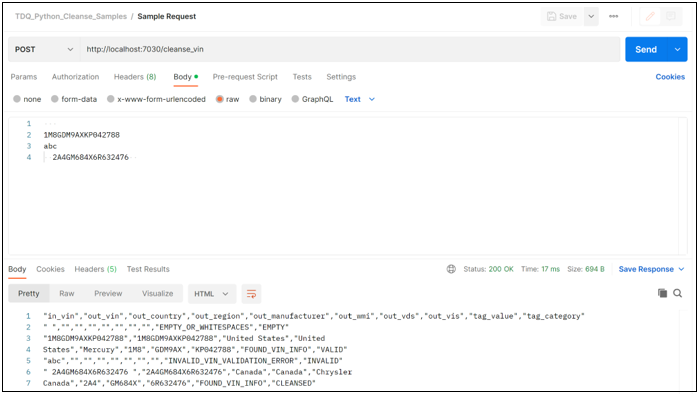
Use an API client like Postman to connect and POST test data to your API. For example:
|
In this section: |
After you have reviewed the TIBCO DQ service requirements, you can begin to create your Python scripts, as described in the following sections.
Create a python script with two function definitions:
Attached is a template for creating new Python cleanse functions. Every section of this code is commented as:
Note: This template does not include code for error handling, logging, and authentication. Python developers are responsible for implementing the coding and engineering best practices applicable to their organization.
Create a Python script to expose your cleanse routine as a REST API.
We are using Flask (a lightweight Python web framework) for this tutorial. For production, the Flask program should be invoked using a more robust server (for example, Gunicorn).
Note: This template does not include code for error handling, logging, and authentication. Python developers are responsible for implementing the coding and engineering best practices applicable to their organization.
Use an API client like Postman to connect and POST test data to your API. For example:
Service Definition JSON
Create a definition for the service in JSON format (an example is included below). Unless otherwise noted, the field is required.
|
Attribute |
Description |
|---|---|
|
name |
Name of the service, must be unique in the custom workspace. |
|
description |
A brief description of the service. |
|
location |
Service location URL. |
|
sendFullDataSet |
Optional. Set this to true if the service expects the entire data set as input, as opposed to one row at a time. |
|
supportsJson |
Optional. Set this to true if the service can interpret the request body in JSON format and generate a response in JSON format. |
|
inputColumns |
An array of paired values that have:
|
|
outputColumns |
An array of paired values that have:
|
|
parameters |
Optional. An array of values that have:
|
|
credentials |
Optional. A pair of values that have:
|
The following is an example of a JSON document for a new service called cleanse_vin:
{
	"name": "custom_cleanse_vin",
	"description": "Cleanses and validates Vehicle Identification Numbers",
	"location": "http://docker.internal.host:7030/cleanse_vin",
	"inputColumns": [
		{
			"description": "Input value for Vehicle Identification Number",
			"name": "in_vin"
		}
	],
	"outputColumns": [
		{
			"name": "out_vin",
			"description": "input value when tag_category is VALID, cleansed value when tag_category is CLEANSED, default value when tag_category is MISSING or INVALID"
		},
		{
			"name": "out_country",
			"description": "Country where the vehicle was manufactured"
		},
		{
			"name": "out_region",
			"description": "Region where the vehicle was manufactured"
		},
		{
			"name": "out_manufacturer",
			"description": "Name of the manufacturer"
		},
		{
			"name": "out_wmi",
			"description": "World Manufacturer Identifier"
		},
		{
			"name": "out_vds",
			"description": "Vehicle Descriptor Section"
		},
	{
			"name": "out_vis",
			"description": "Vehicle Identification Section"
		},
		{
			"description": "Tag value that provides explanation for malformed, unexpected or missing data",
			"name": "tag_value"
		},
		{
			"description": "Tag category that categorizes tags as Missing Data, Cleansed Data or Invalid Data",
			"name": "tag_category"
		}
	],
	"tags": [
		{
			"description": "Input value is an empty string or contains all whitespaces",
			"name": "EMPTY_OR_WHITESPACES"
		},
		{
			"description": "Input value is valid and VIN information was successfully retrieved",
			"name": "FOUND_VIN_INFO"
		},
		{
			"description": "VIN information not found",
			"name": "COULD_NOT_FIND_VIN_INFO"
		},
		{
			"description": "Input value is INVALID and failed checksum",
			"name": "INVALID_VIN_FAILED_CHECKSUM"
		},
		{
			"description": "Input value is invalid and failed VIN validation",
			"name": "INVALID_VIN_VALIDATION_ERROR"
		}
	]
}
Service Registration Endpoint
To register a new service, POST the service definition JSON (described above) to the following endpoint:
https://{{host}}:9803/api/v1/serviceThe response will contain the ID of the new service.
If a new service is successfully registered, it will be available for Rule authors to create new TIBCO DQ Rules using this new service.