Locating System Logs

In this section:

TIBCO DQ log files are written to a Docker volume, and the location of this volume can vary with the type of Docker installation.

Docker Desktop

In the Docker Desktop user interface, view Volumes using the menu on the left side of the screen, as shown in the following image.
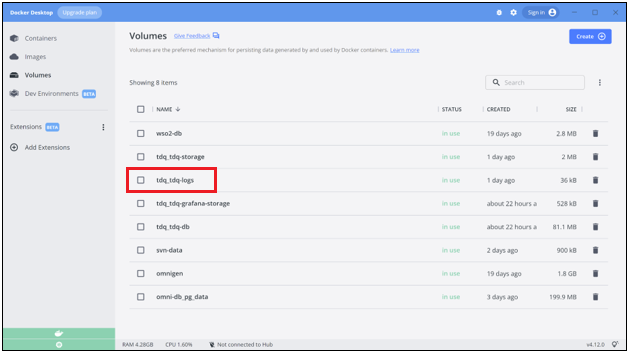
Click the tdq_tdq-logs volume.

A list of containers in the tdq_tdq-logs is displayed, as shown in the following image.
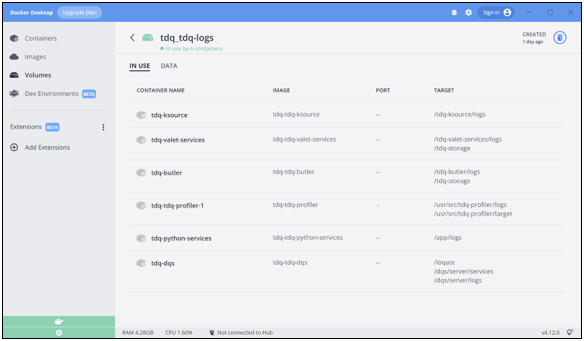
Navigate to the DATA tab and select a log file. A menu will appear that will allow you to download the file, as shown in the following image.
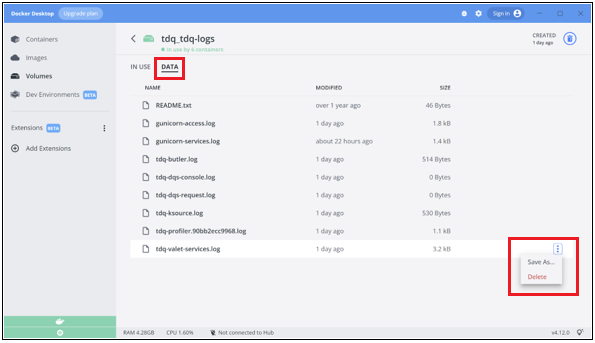
If you are using the WSL2 engine with Docker Desktop, then the tdq-logs volume can be accessed through the WSL2 file system at:

/mnt/wsl/docker-desktop-data/version-pack-data/community/docker/volumes/tdq_tdq-logs/_data

You could tail the profiler log, for example, as follows:

sudo tail -f /mnt/wsl/docker-desktop-data/version-pack-data/community/docker/volumes/tdq_tdq-logs/_data/tdq-profiler.log

Linux

On Linux, Docker volumes are usually found in /var/lib/docker/volumes, so you could tail the profiler log as follows:

sudo tail -f /var/lib/docker/volumes/tdq_tdq-logs/_data/tdq-profiler.log

Copying Logs From a Container

If the above methods do not work, you can use the Docker cp command to retrieve the log files from a running container. First, get the container ID for tdq-butler:

$ docker ps      
CONTAINER ID IMAGE NAME COMMAND CREATED STATUS PORTS
ca67baeeefb6 tdq-tdq-nginx "/docker-entrypoint.…" 25 hours ago Up About a minute 0.0.0.0:9800->80/tcp
45141770213a tdq-tdq-valet-ui "npm start" 25 hours ago Up About a minute 0.0.0.0:9801->81/tcp
79e739ebed6c tdq-tdq-valet-services "/tdq-valet-services…" 25 hours ago Up About a minute 0.0.0.0:9803->83/tcp
b385822c72be tdq-tdq-butler "/tdq-butler/docker-…" 25 hours ago Up About a minute 0.0.0.0:9807->87/tcp

Then copy the /logs directory from the container to the host, using the ID of the tdq-butler container:

$ docker cp b385822c72be:/tdq-butler/logs .

$ ls -l ./logs/
total 48
-rw-r--r-- 1 sdewitt sdewitt   46 Jan 18  2021 README.txt
-rw-r--r-- 1 sdewitt sdewitt 1820 Sep 27 10:46 gunicorn-access.log
-rw-r--r-- 1 sdewitt sdewitt  818 Sep 28 11:30 gunicorn-services.log
-rw-r--r-- 1 sdewitt sdewitt 1474 Sep 27 13:11 gunicorn-services.log.2022-09-27
-rw-r--r-- 1 sdewitt sdewitt  281 Sep 28 11:31 tdq-butler-2022-09-27.0.log.gz
-rw-r--r-- 1 sdewitt sdewitt  514 Sep 28 11:31 tdq-butler.log
-rw-r--r-- 1 sdewitt sdewitt    0 Sep 27 10:38 tdq-dqs-console.log
-rw-r--r-- 1 sdewitt sdewitt    0 Sep 28 11:30 tdq-dqs-request.log
-rw-r--r-- 1 sdewitt sdewitt  285 Sep 28 11:30 tdq-ksource-2022-09-27.0.log.gz
-rw-r--r-- 1 sdewitt sdewitt  530 Sep 28 11:31 tdq-ksource.log
-rw-r--r-- 1 sdewitt sdewitt   90 Sep 28 11:31 tdq-profiler.90bb2ecc9968.log
-rw-r--r-- 1 sdewitt sdewitt 1113 Sep 27 10:43 tdq-profiler.90bb2ecc9968.log.2022-09-27
-rw-r--r-- 1 sdewitt sdewitt  740 Sep 28 11:31 tdq-valet-services-2022-09-27.0.log.gz
-rw-r--r-- 1 sdewitt sdewitt  511 Sep 28 11:31 tdq-valet-services.log