Copyright © Cloud Software Group, Inc. All Rights Reserved


Chapter 4 Creating and Deploying Applications : Creating an Application

Creating an Application
To create an application in TIBCO Administrator, you must import an enterprise archive file created in TIBCO Designer. See Chapter 3, Creating an Archive for Deployment for more information.
To create an application, perform the following procedure:
1.
Select either Application Management, a previously created folder or All Applications.
2.
Click New Application.
3.
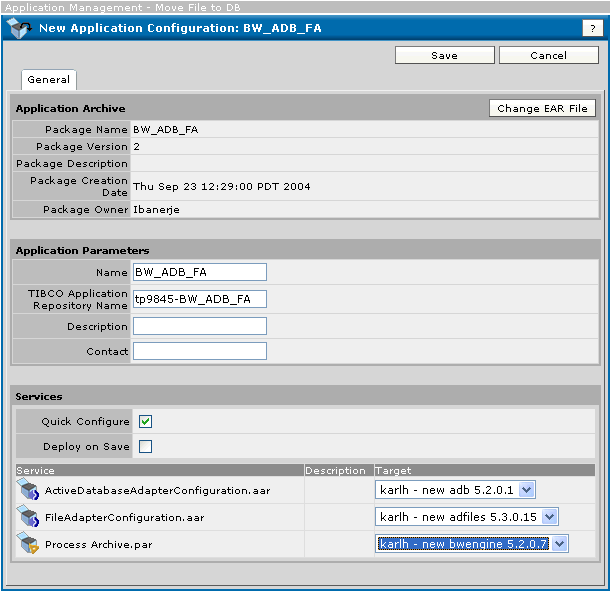
Click Browse and select an enterprise archive file, and then click OK. For example, the next diagram shows a new application, ready for deployment.
4.
Click Save.
Once an application is created, you specify deployment configuration information, such as which machines should run which process engines in the application. Then the application can be deployed and the process engines can be started.
You can use the same enterprise archive file to create multiple applications and configure and deploy each application separately with different deployment options. This allows you to balance the load of the application across multiple machines.
You can also modify a deployed application and redeploy it. Also, you can revert to an earlier deployment if the changes you made do not have the desired result.
You have the following choices when creating an application:
If Quick Configure is selected, the services are bound to the targets selected in the target field.
If Quick Configure is selected, Deploy on Save can be selected. When the Save button is clicked, the application is created and immediately deployed to the target machines specified in the Services pane, Target column. All variables, logging and other configuration values will use defaults defined in the archive file. The next screen will display the deployment status.
If Deploy on Save is not selected, the application must be explicitly deployed using the application’s Configuration Console that displays upon save. This allows you to change settings, such as global variable settings and runtime options before deploying.

Copyright © Cloud Software Group, Inc. All Rights Reserved