Copyright © Cloud Software Group, Inc. All Rights Reserved


Chapter 4 Creating and Deploying Applications : Deploying an Application

Deploying an Application
When you deploy an application, TIBCO Administrator copies any required configuration information to the target machine and creates services to run the deployed process engines. You can automatically start any deployed services after the application is successfully deployed.
You can make changes to a deployed application, and then deploy the changed application. The currently deployed application can continue to run while you make changes. When you deploy the updated application, the current application is automatically undeployed. You can revert to a previously deployed application, if the changes you made need be rolled back.
You may want to change:
To deploy an application, perform the following procedure:
1.
Click Application Management.
2.
Click ApplicationName > Configuration, where ApplicationName is the application created when you loaded the enterprise archive file. See Creating an Application.
3.
Click the service instance (<machine-name>-Process Archive), to change server settings. See Edit Service Instance Dialog.
4.
Click Deploy.
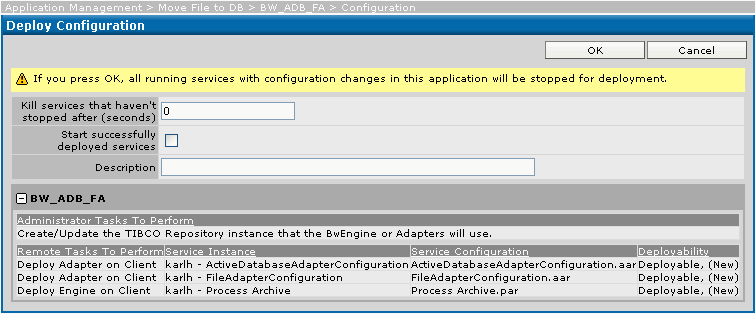
The dialog similar to the following displays and informs you that all running processes with configuration changes in this application will be stopped when you click OK to deploy. If processes deploy successfully, they are restarted automatically if the corresponding check box was selected.
The dialog allows you to add a description and displays information about the application and each service.
5.
Click OK to deploy the application, or click Cancel to choose an advanced configuration, different archive file, or make other changes.
Deploying Applications Manually
 
Scripting tools are used to build an EAR file for an application configured in TIBCO Designer. The application can then be loaded into one or more TIBCO Administrator administration domains.
Deployment options can be specified in a deployment configuration file that is created using the AppManage utility.
The AppManage utility, creates an XML based deployment configuration file in which the deployment options can be defined. The utility also uploads the deployment file and EAR file into the TIBCO Administrator administration domain.
 
See TIBCORuntime Agent Scripting Deployment User’s Guide for instructions on using the AppManage scripting utility to deploy applications.

Copyright © Cloud Software Group, Inc. All Rights Reserved