|
| Copyright © Cloud Software Group, Inc. All Rights Reserved |
• TIBCO Runtime Agent (TRA) supplies a number of TIBCO and third-party libraries used by TIBCO ActiveMatrix BusinessWorks and other TIBCO products both at design-time and runtime. This includes, for example, TIBCO Rendezvous software. You must install TIBCO Runtime Agent on each machine that hosts a TIBCO ActiveMatrix BusinessWorks process engine.
− TIBCO Designer is a graphical user interface (GUI) that is installed as part of TRA. TIBCO Designer provides and easy-to-use design-time environment that supports adapter configuration, process design, and testing of the integration project.
• TIBCO Administrator supports deployment, security administration, and monitoring and management of processes and machines. TIBCO Administrator consists of the TIBCO Administration Server and the web browser based TIBCO Administrator GUI.
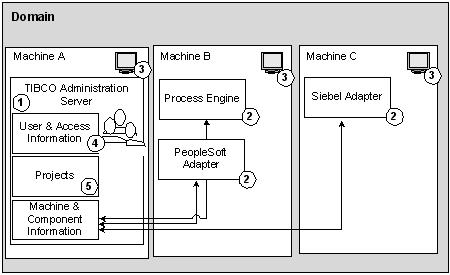
• The TIBCO ActiveMatrix BusinessWorks engine runs the business processes in test mode and at run-time.A TIBCO administration domain is a collection of users, machines, and TIBCO ActiveMatrix BusinessWorks components that a TIBCO Administration Server monitors and manages. There is only one Administration Server for each administration domain. Components within an administration domain can communicate with systems outside the domain, but the administration domain is the administrative boundary of an enterprise integration project.Figure 5 illustrates an administration domain and its contents.
1. TIBCO Administration Server—Each administration domain has one and only one TIBCO Administration Server.
2. Components—Component software includes the TIBCO ActiveMatrix BusinessWorks engine and adapters.
3. Machines—Each TIBCO administration domain contains one or more machines. A machine can be added to an administration domain when a TIBCO ActiveMatrix BusinessWorks component or adapter is installed. By default, all machines within an administration domain are expected to be in the same network subnet. You can, however, set up your system to use TIBCO Rendezvous rvrd and can then use TIBCO ActiveMatrix BusinessWorks across subnets.
4. User and Access Information—User and authorization information is specified with the TIBCO Administrator GUI and stored in the domain data store. See Security below.
5. Projects—A project is created with the TIBCO Designer GUI. You create an Enterprise Archive file (EAR file) for the project with TIBCO Designer, then send that file to the machine where administration server resides. You can then deploy the project with TIBCO Administrator. Once deployed, the project becomes visible in the TIBCO Administrator GUI and its components can be started, stopped, and monitored from there. See Projects.
• Authentication—The verification of the identity of a person or process.
• Authorization—Permission to view or execute. An administrator gives users access rights to the functionality of the product they need. For example, access rights are given to view or to write to projects at design time from TIBCO Designer or to view or to manage modules from the TIBCO Administrator console. The TIBCO Administration Server controls that access.
|
| Copyright © Cloud Software Group, Inc. All Rights Reserved |