Copyright © Cloud Software Group, Inc. All Rights Reserved


Chapter 1 Business Integration : Architecture

Architecture
This section explains the TIBCO ActiveMatrix BusinessWorks architecture at design time and runtime. It discusses these topics:
Fundamentals
The TIBCO ActiveMatrix BusinessWorks architecture is based on the following set of fundamentals:
Support for Standards
Your integration platform must support standards for several reasons. A standards-based integration platform supports you best as you add applications to your enterprise or need to communicate with new business partners. Standards are essential as you are planning for the future of the project because standards facilitate updates. Some of the applications you use may already be using standards, and integration development will be faster and easier. Support for standards also removes dependency on one company’s services and makes applications from different companies interact more easily.
TIBCO ActiveMatrix BusinessWorks supports the most widely used standards for the different aspects of an integration project:
J2EE Compliant—JMS, EJB, JNDI
Protocols—Web services (SOAP, WSDL), HTTP, HTTPS
Messaging—JMS, TIBCO Rendezvous
Data Description—Native support for DTD, XSD, and TIBCO AE Schema
Data Representation and Expressions—Native support for XML, XPath
TIBCO ActiveMatrix BusinessWorks also supports a plug-in for B2B interactions.
Integrated Development Environment
Your integration project must be supported by an integrated development environment that spans all phases of the project. With TIBCO ActiveMatrix BusinessWorks, the process design, deployment, and run-time environment are tightly integrated even though the run-time environment supports a distributed architecture.
1.
2.
3.
4.
5.
Extensibility and Scalability
As your enterprise grows, new applications are added and volume of data increases. Scalability to support higher volume and extensibility to support additional applications or a larger number of process engines or adapter instances become paramount.
TIBCO ActiveMatrix BusinessWorks has been designed to be extensible and scalable. Working in a distributed fashion, you deploy the different adapter services and business processes on different machines in the administration domain. When the business process applications’ volume increases, you add machines to the domain. As you acquire new applications for your enterprise, you install the appropriate adapters into the domain. You configure the adapter, modify your process definition, then deploy the adapter service on the machine of your choice.
Design-Time Architecture
At design time, you work with the TIBCO Designer GUI to configure adapter services and design business processes. You design a business process by dragging activities (e.g. Read File or Send Mail) into the design window and joining the activities using transitions. The TIBCO Designer test mode allows you to debug the business process.
You can provide input, add breakpoints, supply values for variables, and so on. See the TIBCO Designer User’s Guide for more information.
TIBCO Designer Layout
The TIBCO Designer main window has three or four panels that contain the design-time components of an integration project. You can configure the TIBCO Designer GUI to either display the project and palette panels separately or together. The TIBCO Designer GUI is discussed in more detail in the TIBCO Designer User’s Guide.
Figure 6 TIBCO Designer main window
Projects
A project consists of resources that contain the functionality needed for your integration system. This includes services (producers and consumers of information) and any business logic that may be applied to that information.
In TIBCO Designer, you click the project folder to display the project’s resources. The IntegrationProject project, shown in the project tree panel in Figure 7, consists of several components:
Two process definitions (ProcessOrder and ShippingSchedule)
For a description of the example scenario that was used as the basis for this project, see Business Integration Scenario.
Figure 7 TIBCO ActiveMatrix BusinessWorks project and resources
Resources
Resources are the components of a project. A TIBCO Designer resource corresponds to an object in a TIBCO application, such as an FTP activity, a process definition, or a specific adapter instance.
Figure 8 Resources in project tree and design pane
Palettes
Context-sensitive palettes organize resources into related groups. Which palette is displayed depends on the currently opened resource and on your preferences. You drag and drop resources from the palette into the design panel to add them to your project. The main window shown in TIBCO Designer Layout has several palettes in the palette panel.
Enterprise Archive
The Enterprise Archive resource allows you to create an Enterprise Archive file (EAR file) that you can use to deploy the project. The EAR file contains shared archives and process archives that you specify. These archives contain the adapter configurations and process definitions you wish to deploy. After saving the Enterprise Archive file, you can send it to the machine where the administration server resides. TIBCO Administrator can use the EAR file to create a deployment configuration.
See TIBCO ActiveMatrix BusinessWorks Administration for more information about creating Enterprise Archive files and deploying projects.
Run-Time Architecture
When the integration project is deployed, the different process engines and adapters are ready to run on the machines in the administration domain.
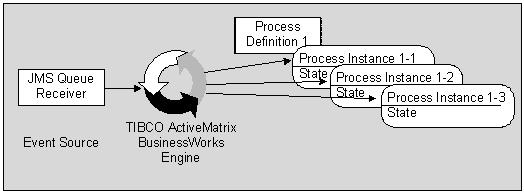
You deploy your project and start each component individually from the TIBCO Administrator GUI. After all adapters and process engines have been started, process instances are created by process starters. A process starter could be, for example, a File Poller or an Adapter Subscriber activity waiting for incoming data. When data arrives, the process starter creates a process instance using the process definition to which it belongs, and the activities in the process are executed in sequence.
In Figure 9, a JMS Queue Receiver activity creates an instance of the process definition to which it belongs each time it receives input.
Figure 9 Process instances created from a process definition
While different process instances are running, any alerts that were scheduled during deployment configuration are sent to the specified recipient by the TIBCO Administration server. In addition, the TIBCO Administrator GUI allows monitoring of the running project at different levels of detail, and can collect tracing information for later analysis.
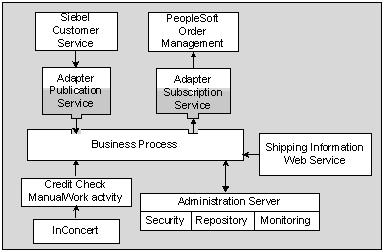
For the example discussed in this manual, the process engine could perform these tasks:
All components are monitored and managed by way of TIBCO Administrator, which also provides security and repository management. Users can access TIBCO Administrator using the TIBCO Administrator GUI.
Figure 10 Example scenario data flow

Copyright © Cloud Software Group, Inc. All Rights Reserved