Copyright © Cloud Software Group, Inc. All Rights Reserved


Chapter 1 Business Integration : TIBCO ActiveMatrix BusinessWorks Features

TIBCO ActiveMatrix BusinessWorks Features
This section discusses some TIBCO ActiveMatrix BusinessWorks features.
Messaging
To support your integration project at run-time, you need a messaging system that can reliably handle the volume of messages that will be sent and received. The system should have these characteristics:
Guaranteed delivery and fault tolerance—Message delivery must be guaranteed, and the system must be fault tolerant. If a message cannot be delivered because the recipient was unavailable, the messaging system must queue that message and continue to operate. The queued message must then be redelivered as appropriate.
Distributed architecture—A distributed, loosely coupled system is much more likely to support the fault-tolerance you require than a monolithic system that depends on one centralized server.
High throughput—High throughput without performance degradation is needed. Requirements vary throughout the day and throughout the business year, and you cannot afford performance degradation at the time when business increases.
Scalability—As your business grows, you want to be able to update your business integration in a simple and cohesive way. Furthermore, you want to be able to connect your integration project with other departments using a similar system. The messaging system must support this scalability.
TIBCO ActiveMatrix BusinessWorks is based on messaging standards with proven track records. Supported protocols include TIBCO Rendezvous, JMS, and HTTP.
Adapters
Business information is distributed among different business applications (such as SAP R/3 or PeopleSoft) or available from databases or files. Adapters help make this information available to the business process by "adapting" the applications to a common messaging system.
What are Adapters?
Adapters translate information into the appropriate format:
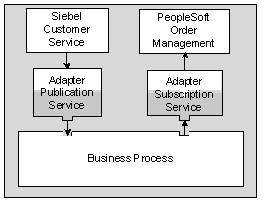
The illustration below shows how a Siebel customer service system communicates with the business process using an adapter publication service and the business process communicates with the PeopleSoft Order Management system using an adapter subscription service.
Figure 11 Adapter data flow
In TIBCO ActiveMatrix BusinessWorks, adapters provide services to activities inside the business process.
Adapter Features
Companies in a wide range of industries have successfully used TIBCO adapters to integrate different packages and custom applications. TIBCO ActiveMatrix BusinessWorks includes second-generation adapters that are based on the same technology but have the following new features:
Easy Configuration With Design-Time Adapter—All adapters included with TIBCO ActiveMatrix BusinessWorks use a unified GUI that simplifies adapter configuration. A Design-Time Adapter allows you to directly access the source application from the TIBCO Designer GUI and specify the data the business process needs.
Easy Inclusion in Business Processes—The business process can communicate with adapters by using activities found in the adapter palette. These activities interact with each of the standard adapter services. For example, the Publish to Adapter activity sends a message to an adapter subscription service.
Easy Deployment and Monitoring—When you are ready to deploy your project, the TIBCO Designer deployment palette allows you to assign each adapter to its own machine. At run-time, the TIBCO Administrator GUI monitors each adapter in its own panel. You can therefore easily see if one of the adapters is a bottleneck in the business process flow.
TIBCO ActiveMatrix BusinessWorks Adapters
A fully integrated TIBCO ActiveMatrix BusinessWorks adapter can be installed into a TIBCO administration domain and later monitored and managed from the TIBCO Administrator GUI. TIBCO ActiveMatrix BusinessWorks fully integrates with the following adapters:
Technology adapters—Includes adapters that access files or databases.
Application adapters—Includes adapter for PeopleSoft, SAP R/3, Siebel, and others.
Other TIBCO Adapters can be loaded into TIBCO Designer and configured using the Generic Adapter Configuration resources. These adapters can then be used in process design and run as part of the integration project. They cannot, however, be installed into the administration domain or monitored and managed via TIBCO Administrator.
For more information, see Phase 3: Services Configuration.
Business Process Modelling
The business processes describe the actual flow of data inside the enterprise. In TIBCO ActiveMatrix BusinessWorks, you use the TIBCO Designer GUI to design and test your processes. Features include:
A complete set of commonly used activities such as File Read, File Write, and File Create, a set of email activities, timers, FTP activities, etc.
See Phase 4: Business Process Design, and the TIBCO ActiveMatrix BusinessWorks Process Design Guide.
The illustration below shows a simple process that is part of the example scenario in the design window.
Figure 12 Example process
Schemas and Data Mapping
Different applications in your enterprise use different data representations. For example, a purchase order in a PeopleSoft system differs from a purchase order in a Siebel customer service system. TIBCO ActiveMatrix BusinessWorks allows you to view and manipulate the data coming from and going into each service or activity using XML schemas.
This section first gives a brief introduction to schema (Understanding Schemas), then discusses "Schemas in TIBCO ActiveMatrix BusinessWorks."
Understanding Schemas
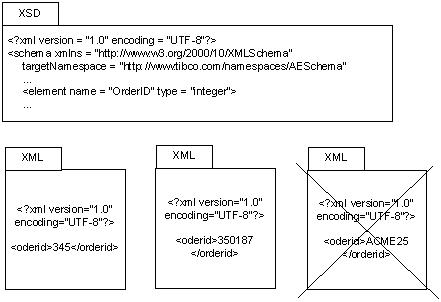
The example below shows a simplified XSD (XML Schema Definition) that includes an Order ID element restricted to integer data. Incoming XML documents that use integers for the Order ID are allowed, while an alphanumeric Order ID is rejected.
Figure 13 XML files conforming or not conforming to XSD
Schemas are especially useful if you are deploying a complex system. Schemas are used by the running application but are not included in the code. The use of schemas makes it possible to enforce that outgoing and incoming data strictly comply with the prespecified data description.
Schemas in TIBCO ActiveMatrix BusinessWorks
In the TIBCO Designer GUI, you can define the schema for adapters and view and manipulate the schema for each activity in the business process.
For business process activities, you can view the available process data and define the input schema for each activity. The process data is the list of available data for that activity. The input schema (required or optional) defines input values for an activity.
You can map the process data to the input data using a drag and drop interface. You can specify conditional mapping using XPath, and you do not need detailed knowledge of XPath for simple conditions. See Step 7: Perform Mapping and Transformation for Each Activity (Chapter 6).
Data mapping is discussed in detail in the TIBCO BusinessWorks Process Design Guide.
Manual Activities
TIBCO ActiveMatrix BusinessWorks includes a ManualWork palette with activities that you can add to your business processes when the process requires user interaction for completion. In our example, orders under $10 000 were processed automatically. For orders over 10 000, an additional credit check is required.
In that case, the order is assigned to a pool of users for approval. One user accepts the request, and approves or rejects it. If no one accepts the request, the manual approval times out, and then the status of the request is checked. If no errors were returned, then the work is still in the users’ queue, so the process waits for the completion of the manual work. If errors were reported in the manual work, the work is marked as not approved and the process completes.
TIBCO ActiveMatrix BusinessWorks allows you to:
The ManualWork palette works with TIBCO InConcert. Users and groups are defined either in TIBCO InConcert or TIBCO Administrator (and then later exported to TIBCO InConcert). An activity that assigns work creates a TIBCO InConcert job. The job can be viewed and modified using TIBCO ActiveMatrix BusinessWorks web interface to manual tasks.

Copyright © Cloud Software Group, Inc. All Rights Reserved