Copyright © Cloud Software Group, Inc. All Rights Reserved


Chapter 5 Phase 3: Services Configuration : Step 4: Accessing the Adapter Service From the Process

Step 4: Accessing the Adapter Service From the Process
After you have configured the adapter service, you can access it from the process definition. Creating a process is explained in Phase 4: Business Process Design. Once a process is part of your project, you can access adapters as follows:
1.
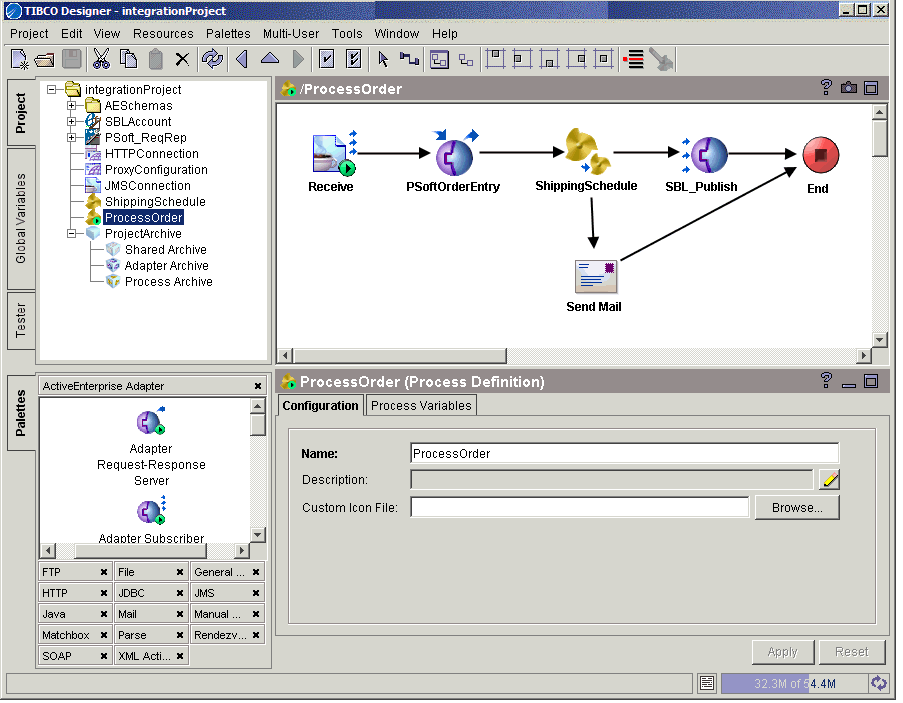
Select the process definition, then open the ActiveEnterprise Adapter palette.
Figure 17 Adding activities that access adapter services
2.
Publish to Adapter—Publishes data from the process to an adapter, which subscribes to data coming from the process and passes the data to the target application. In the example above, a Publish to Adapter activity interacts with a Siebel subscriber.
Adapter Subscriber—Subscribes to incoming data published by the adapter.
Invoke an Adapter Request-Response Service—Communicates (as a client) with an adapter request-response service.
Adapter Request-Response Server—Starts a process based on the receipt of a request from an adapter.
Respond to Adapter Request—Sends a response to an adapter for a previously received request.
Wait for Adapter Message—Waits for the receipt of a message from the publication service of the specified adapter.
Wait for Adapter Request—Waits for the receipt of a request from a request-response invocation service.
3.
4.

Copyright © Cloud Software Group, Inc. All Rights Reserved