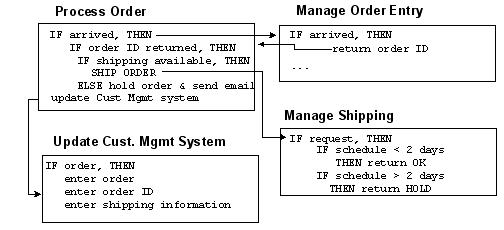
Introduction In an integrated enterprise, business processes manage the flow of information between different data sources and destinations. The business processes receive information, process it if needed, and hand it off as appropriate. Business Processes In many companies, the business rules that tie enterprise applications together are handled by custom-written code or even by manual processes. TIBCO ActiveMatrix BusinessWorks allows you to establish this data flow using activities available in the TIBCO Designer process design palettes. You design the process using predefined activities and can execute your process without writing a lot of custom code. The following diagram illustrates a business process flow that describes the business rules between the various systems in an enterprise. Figure 18 Business process flow Process Design Steps Process design consists of a number of steps discussed in this chapter. • Step 1: Define Shared Resources • Step 2: Create Process Definitions • Step 3: Add a Process Starter • Step 4: Add Activities • Step 5: Optionally, Add Manual Work Activities • Step 6: Create Transitions Between Activities • Step 7: Perform Mapping and Transformation for Each Activity • Step 8: Optionally, Group Activities As Needed • Step 9: Test the Process The steps discussed in this chapter do not necessarily have to be performed in this order. For example, you could define shared resources as needed or add transitions each time you add an activity