Copyright © Cloud Software Group, Inc. All Rights Reserved


Chapter 6 Phase 4: Business Process Design : Step 1: Define Shared Resources

Step 1: Define Shared Resources
Shared resources allow activities to share information. For example, you can define a JDBC Connection resource, then use it in any of the JDBC activities in your business process.
Shared resources are available in some palettes and include Rendezvous Transport, JDBC Connection, JMS Connection, and so on.
To define a shared resource, follow these steps:
1.
2.
3.
You can now use the shared resource in any activity that requires it.
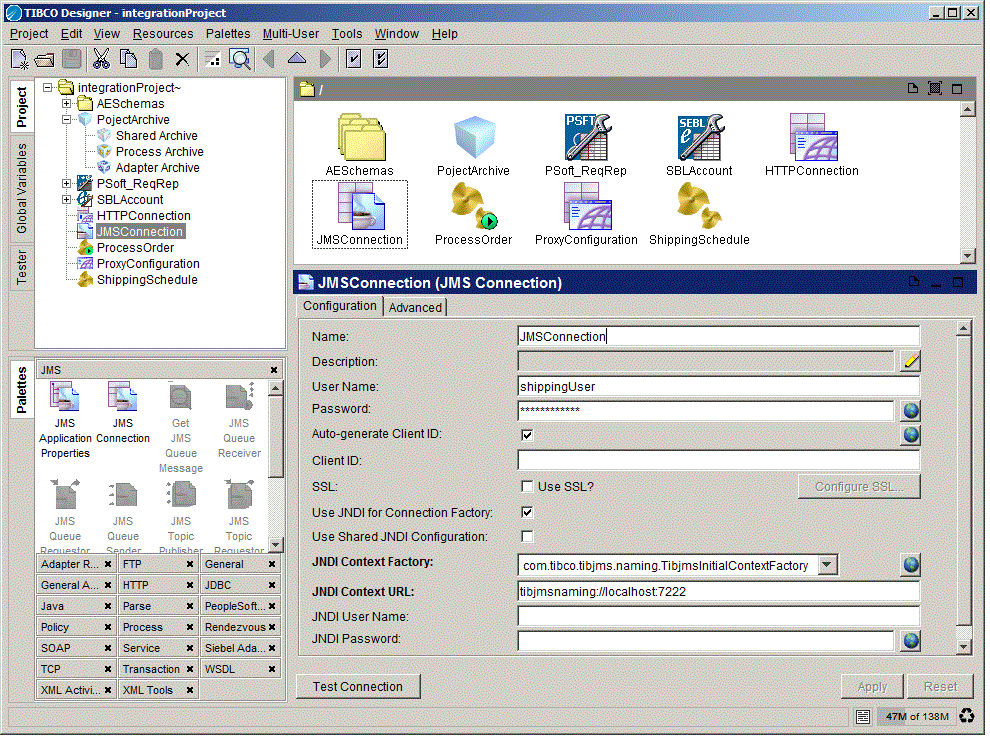
For example, the JMS Queue Receiver activity the example uses to connect to the application server requires a JMS Connection shared resource.
.
Figure 19 Shared resources in your project

Copyright © Cloud Software Group, Inc. All Rights Reserved