Copyright © Cloud Software Group, Inc. All Rights Reserved


Chapter 6 Phase 4: Business Process Design : Step 4: Add Activities

Step 4: Add Activities
Activities are the individual units of work within a process definition. Activities are generally operations that interface to external systems, but activities can also perform internal processing.
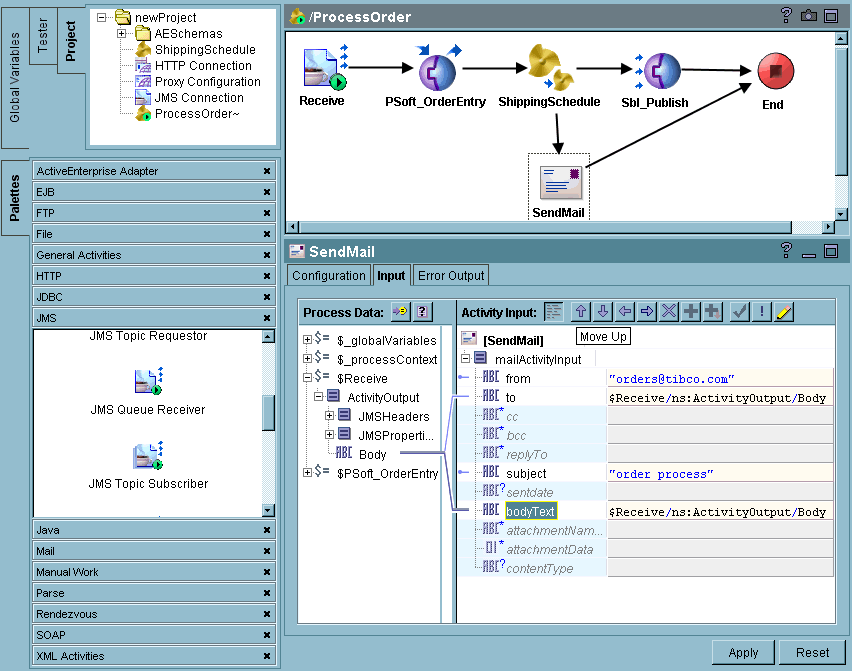
When you select a process definition, activities become available on the various TIBCO Designer palettes. Each palette has a set of activities that can be performed for that palette. For example, the ActiveEnterprise Adapter palette has activities that can publish messages to a specified adapter or invoke an operation by way of an adapter. The JMS palette includes activities such as JMS Queue Sender and JMS Queue Receiver.
A general-purpose Java Code activity allows you to write and execute standard Java code to perform custom processing within your process definition.
To add an activity to the process definition in TIBCO Designer, follow these steps:
1.
2.
3.
Figure 22 Adding activities

Copyright © Cloud Software Group, Inc. All Rights Reserved