Copyright © Cloud Software Group, Inc. All Rights Reserved


Chapter 11 Parse Palette : Data Format

Data Format
Shared Configuration
The Data Format resource contains the specification for parsing or rendering a text string using the Parse Data and Render Data activities. This shared configuration resource specifies the type of formatting for the text (delimited columns or fixed-width columns), the column separator for delimited columns, the line separator, and the fill character and field offsets for fixed-width columns. You must also specify the data schema to use for parsing or rendering the text.
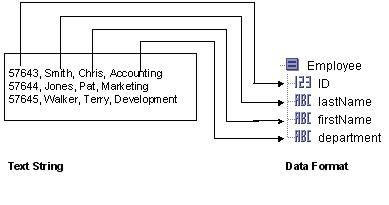
When parsing text, each column of an input line is transformed into the corresponding item in the specified data schema. The first column of the text line is turned into the first item in the data schema, the second column is transformed into the second item, and so on. Each line is treated as a record, and multiple lines result in a repeating data schema containing the lines of the input text string.
Figure 19 illustrates how an input text string is parsed into a specified data schema.
Figure 19 Parsing a text string into a data schema
When rendering text, each record in the input data schema is transformed into a line of output text. The first item of the data schema is transformed into the first column of the text line, the second item is transformed into the second column, and so on. Each record in a repeating data schema is transformed into a separate line in the output text string. Rendering a data schema into a text string is exactly the opposite process of parsing a text string into a data schema. Rendering is the reverse of the process illustrated in Figure 19.
Configuration
The Configuration tab has the following fields.
Data Format
The Data Format tab allows you to define a custom schema for the text.
You can define your own datatype on this tab, and you can reference XML schema or ActiveEnterprise classes stored in the project. Once defined, the data specified on the Data Format tab is used to parse a text string into the specified schema or render the specified schema as a text string.
See Appendix A, Specifying Data Schema for a description of how to define a schema.
Delimiter Separated Fields
When processing delimiter-separated text, each field in the input line is separated by the delimiter specified by the Column Separator field. Leading and trailing spaces are stripped from each field and the specified Line Separator determines when a new record starts. Figure 19 illustrates an series of input lines containing comma-separated fields, each record on one line.
In some situations, you may not be able to choose a column separator character that does not appear in any column data. For example, if you choose a comma as the column separator, there may be commas in some of the column values. To process data that contains column separator characters in a column, you can surround the column with double quotes (" "). Double quotes also allow you to include leading and trailing spaces as well as line breaks in a field. If you want to have a double quote appear in a field, escape the double quote by using two consecutive double quotes. That is, use "" to represent a double quote in a field.
The following data illustrates input lines with each field separated by commas. Some fields, however, contain commas, leading or trailing spaces, double quotes, and line breaks.
 
57643, Smith,  "Chris",  Accounting  , "Statement: Be prepared!"
57644, Jones,  "Pat  ",   Marketing   , "Statement: To paraphrase JFK, ""Ask not what your company can do for you,
ask what you can do for your company."""
57645, Walker, "Terry",  Develpment  , "Statement: My goal is to be CEO someday."
Notice that Pat Jones’ statement spans two lines and contains double quotes as well as a comma. The entire field is surrounded by double quotes, so it is still treated as part of the same record.
Field Offsets
When processing fixed format text, you must specify the line length and the column offsets. This allows a Parse Data or Render Data activity to determine where columns and lines begin and end. The Field Offsets tab allows you to specify the format of fixed-width text.
The line length is the total length of each input line, including the line separator character(s). Include the appropriate number of characters for the selected line separator on the Configuration tab to the total length of each line.
The column offset is the starting and ending character position on each line for the column. Each line starts at 0 (zero). For each column of the line, you must specify the name of the data item associated with this column (this is the same name you specified for the corresponding element in the data schema), the starting offset for the column, and the ending offset for the column.
Consider the following text file. The first two lines of the file indicate offset numbers (each 0 indicates another 10 characters), and the fill character between columns is spaces:
 
0           12                30             45
0123456789012345678901234567890123456789012345678901234567
57643       Smith             Chris          Account   
57644       Jones             Pat            Marketing  
57645       Walker            Terry          Develpment
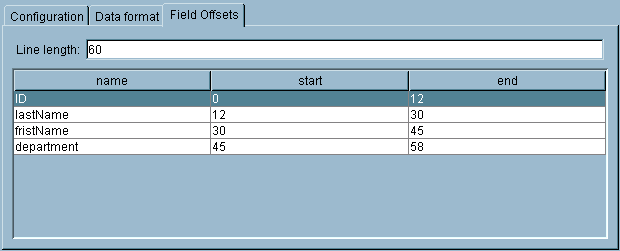
Figure 20 illustrates the Field Offset tab for the file above. Notice that the line length is specified as 60, even thought the offsets end at character number 58. The line separator is specified as "Carriage Return/Line Feed (windows)", so this adds two additional characters for a total line length of 60.
Figure 20 Fixed-width text strings and field offsets

Copyright © Cloud Software Group, Inc. All Rights Reserved