Copyright © Cloud Software Group, Inc. All Rights Reserved


Chapter 13 Rendezvous Palette : Datatype Conversion

Datatype Conversion
When sending or receiving TIBCO Rendezvous messages, TIBCO ActiveMatrix BusinessWorks converts the fields of the message to the correct datatypes. Data in incoming TIBCO Rendezvous messages is converted to TIBCO ActiveMatrix BusinessWorks datatype (and represented in the activity’s output). Data in an outgoing message is converted to TIBCO Rendezvous datatypes.
The following tables describe the corresponding datatypes between TIBCO ActiveMatrix BusinessWorks and TIBCO Rendezvous, depending upon whether TIBCO ActiveMatrix BusinessWorks is sending or receiving the message.
 
TIBRVMSG_XML, TIBRVMSG_IPADDR32, and TIBRVMSG_IPPORT16 Datatypes
If you want to use the TIBRVMSG_XML, TIBRVMSG_IPADDR32, or TIBRVMSG_IPPORT16 datatypes, you must first add the RawRVMsg2.xsd file into your project. See RawRVMsg2 Schema for more information about adding this schema to your project.
Once the RawRVMsg2 schema is in your project, you can reference the ipPort and ipAddr datatypes contained in that schema. These types correctly convert data of type TIBRVMSG_XML, TIBRVMSG_IPADDR32, or TIBRVMSG_IPPORT16 when sending or receiving TIBCO Rendezvous messages.
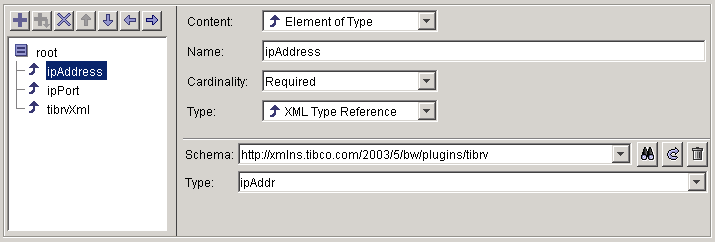
For example, you want to send a message with two fields, ipAddress, ipPort, and tibrvXml. Figure 21 illustrates an Input Editor tab that defines the message structure.
Figure 21 Using the ipPort and ipAddr datatypes
In the content field, Element of Type is chosen. In the Type field, XML Type Reference is chosen to indicate you want to reference a datatype defined in a schema resource. Use the Browse button in the Schema field to locate the RawRVMsg2 schema and select the appropriate type for the field. Figure 22 illustrates selecting the correct type from the RawRvMsg2 schema.
Figure 22 Selecting a type from the RawRVMsg2 schema

Copyright © Cloud Software Group, Inc. All Rights Reserved