Copyright © Cloud Software Group, Inc. All Rights Reserved


Chapter 13 Rendezvous Palette : Raw TIBCO Rendezvous Message Support

Raw TIBCO Rendezvous Message Support
In some situations, you may want to send or receive TIBCO Rendezvous messages without specifying the exact input or output schema. For example, an application may send messages with three different structures on the same subject name. You are interested in receiving all messages, but you only want to process messages when the field named "orderType" has a value of "incomingOrder". TIBCO ActiveMatrix BusinessWorks supplies a generic TIBCO Rendezvous message schema for handling incoming messages without specifying their structure.
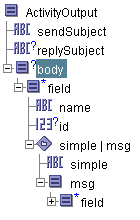
The RawRVMsg2 schema describes a generic message structure. The structure contains a root element named msg. In the msg element is a repeatable element named field. Each field contains a name, id, and a choice element. The choice element contains the data of the field. A field’s data can be either a scalar value or another message.
Figure 23 illustrates the generic TIBCO Rendezvous message schema used in a Rendezvous Subscriber process starter.
Figure 23 Schema for RawRVMsg2.xsd
Before using the RawRVMsg2 schema, you must add the schema to your project. See RawRVMsg2 Schema for more information about adding this schema to your project.
Using the RawRVMsg2 Schema
Once you have the RawRVMsg2 schema in your project, you can reference it in any Input Editor or Output Editor tab on any activity in the TIBCO Rendezvous palette. To use the RawRvMsg2 schema, perform the following;
1.
You can only use the msg element of the RawRVMsg2 schema on the root element in the schema you create in the Input or Output Editor tab. Do not attempt to use this schema for any element that is not the root of the schema.
2.
3.
Use the Browse Resources button in the Schema field to locate and select the RawRVMsg2 schema.
Once the schema is selected, it becomes the schema for incoming or outgoing message bodies.
You can use XPath expressions to extract the desired field from the generic RawRvMsg2 schema. For example, your process begins with a Rendezvous Subscriber activity and you want to perform processing on incoming messages that have a field named "orderType" with a value of "incomingOrder", you would use the following XPath expression to determine which messages meet that criteria:
 
$Rendezvous-Subscriber/ActivityOutput/body/pfx:field/pfx:name
   = "orderType"
and $Rendezvous-Subscriber/ActivityOutput/body/pfx:field/pfx:simple
   = "incomingOrder"
See TIBCO ActiveMatrix BusinessWorks Process Design for more information about XPath.

Copyright © Cloud Software Group, Inc. All Rights Reserved