Copyright © Cloud Software Group, Inc. All Rights Reserved


Appendix A Specifying Data Schema : Editor

Editor
The Editor tab is used to specify a data schema for input or output of an activity. This is useful when the data does not have a well-known structure. The Editor tab is usually named for the type of schema you are creating. For example, the tab may be named "Input Editor" or "Output Editor".
For example, an email message has a well-known data structure, and therefore does not need a special datatype for its input. A JMS message, however, can have application-specific properties of any datatype. The Editor tab allows you to define the schema for any activities that require a specialized input or output schema.
You can use a simple datatype, or you can define a group of data elements on this tab. You can also reference XML schema or ActiveEnterprise classes stored in the project. Once defined, the schema appears on the appropriate tabs of the activity. The data in the schema then becomes available to other activities in the process definition.
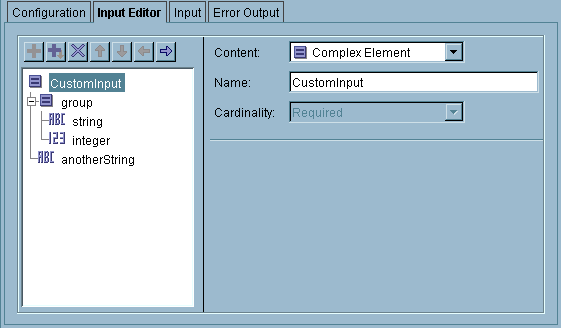
The following illustrates the Editor tab. In this example, the Editor tab is labeled "Input Editor" indicating this is the activity’s input.
To define a schema on this tab, use the icons above the schema tree to add, delete, or move data items. Then use the fields of the dialog to specify the datatype of each item.
 
Table 13 describes the potential content types for data elements.
Table 14 describes the datatypes available for data.
 

Copyright © Cloud Software Group, Inc. All Rights Reserved