Copyright © Cloud Software Group, Inc. All Rights Reserved


Chapter 3 Processes : Developing Process Definitions

Developing Process Definitions
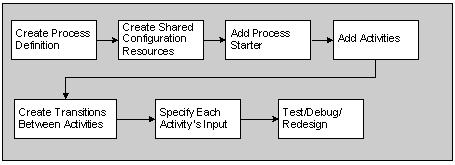
Figure 17 describes the general procedure for developing process definitions.
Figure 17 Developing process definitions
The following is a more detailed description of how to develop process definitions:
1.
2.
For example, if you are going to connect to a database, you should drag and drop a JDBC Connection into the design panel. This describes the username, password, JDBC URL and other information about the connection. You can then use this connection in many process tasks that require a connection to a database.
See TIBCO ActiveMatrix BusinessWorks Palette Reference for more details about each of the shared resources.
3.
Select one of the process definitions you created in Step 1 in the project panel. This causes a blank business process to appear in the design panel. The business process has a Start and an End activity by default.
See Chapter 4, Activities for more information about activities.
4.
For example, if you wish to start a process when an HTTP request is received, select the HTTP activity palette, locate the HTTP Receiver process starter activity, and drag and drop it into the design panel.
5.
6.
7.
See Chapter 5, Transitions and Conditions for more information about specifying transitions.
8.
See Chapter 8, Mapping and Transforming Data for more information about mapping and transforming data.
9.
In testing mode, a TIBCO ActiveMatrix BusinessWorks engine is started to perform the processing described in the process definition. Test and debug your process definition until it operates as expected.
See Chapter 18, Testing Process Definitions for more information about testing process definitions.

Copyright © Cloud Software Group, Inc. All Rights Reserved