Copyright © Cloud Software Group, Inc. All Rights Reserved


Chapter 4 Activities : Input

Input
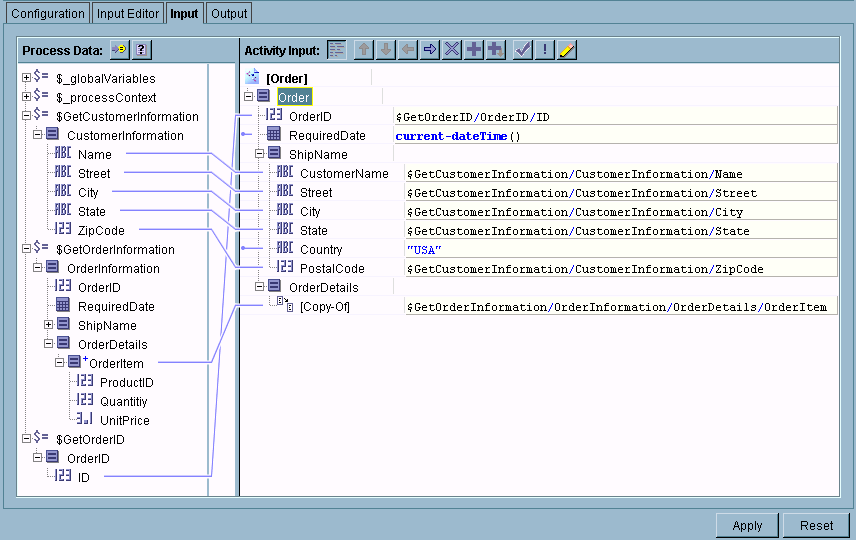
The Input tab allows you to map and transform output data from the previous activities in the process (including the event that starts the process) to input data for the activity. The Process Data area contains the output from all of the activities that appear prior to the activity in the process definition. The Activity Input area lists the current activity’s required and optional input data.
The following illustrates the input tab.
Mapping and Transforming Activity Input Data
You can create mappings between the available output from previous activities and the current activity’s input. You can also specify constants (strings enclosed in quotes or numbers) for any input values, or you can specify conditions on the mappings.
In general, to create a mapping, you click on the desired item in the available schema in the Process Data panel and drag the item to the desired item in the Activity Input panel. If you wish to type in a constant or expression, you can click on the schema item in the Activity Input panel and type the constant or expression into the field.
There are also several icons above the Activity Input area. Table 11 describes the icons and their function.
See Chapter 8, Mapping and Transforming Data for more information about using the Input tab to create mappings between process data and the activity’s input.

Copyright © Cloud Software Group, Inc. All Rights Reserved