Copyright © Cloud Software Group, Inc. All Rights Reserved


Chapter 6 Grouping Activities : Repeat On Error Until True Loop

Repeat On Error Until True Loop
The Repeat On Error Until True loop allows you to repeat a series of activities when an unhandled error occurs. The activities in the group are executed once. If there are no unhandled errors, the loop terminates. If an error occurs for which there is no error transition, the condition of the loop is evaluated — if the condition is true, the loop terminates, if the condition is false, the loop repeats until there is no error occurs or the condition is true.
For example, you may wish to execute a series of activities and retry the execution in the event of an unhandled error. However, you wish to retry the execution only five times, to avoid an infinite loop if the error occurs repeatedly. In this case, specify a repeat on error until true loop with a condition that terminates the execution after five tries.
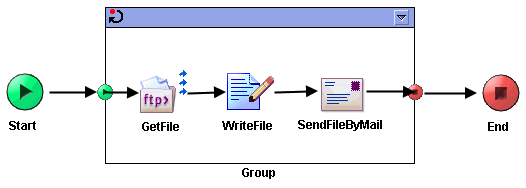
The following illustrates a repeat on error until true loop.
The process performs the following operations:
1.
2.
3.
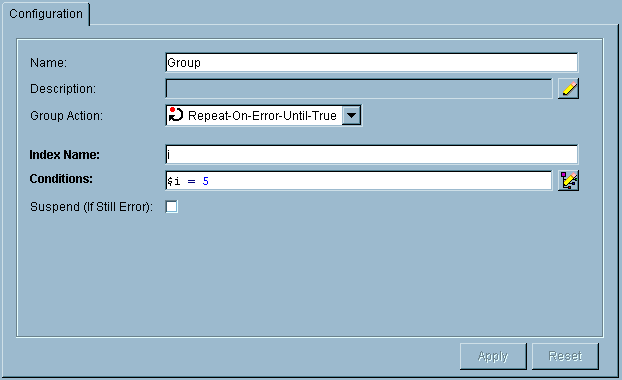
The following is the configuration for this example loop:
The condition is specified as $i = 5, which means that when the index variable is equal to five (that is, the fifth iteration of the loop), the loop exits. The condition is only evaluated upon encountering an unhandled error in the group. If an error is encountered, the loop terminates if the condition evaluates to true. The resulting behavior in this example is that the group of activities executes and loops until either a successful completion of all activities, or until the group is executed five times.
Suspend If Still Error Option
Repeat On Error Until True loops have the Suspend If Still Error option. When this option is checked, the process instance suspends if the error still exists when the condition of the loop is true. The suspended process is displayed by TIBCO Administrator, and the deployment configuration allows you to specify an action to perform if the process is suspended.
This option allows the administrator to correct the problem causing the error. For example, a machine may be down, or an adapter service may not have been started on the machine. After the problem is corrected, the administrator can resume the process execution.
When a process instance resumes execution, the execution resumes before the Repeat On Error Until True loop. The process instance executes the loop, and all process variables are reset to their values before the loop was executed the first time. Therefore, the process instance resumes execution as if the Repeat On Error Until True loop had never executed. The loop is entered again, and if an error occurs, the loop condition is checked as it normally would be.
If the error persists, the process instance continues to be suspended. The administrator can decide whether to resume or kill the process if the error cannot be fixed.
For more information about deployment configuration and specifying actions to perform if processes are suspended, as well as information about how to view suspended processes and resume or kill them, see TIBCO ActiveMatrix BusinessWorks Administration.
 

Copyright © Cloud Software Group, Inc. All Rights Reserved