Copyright © Cloud Software Group, Inc. All Rights Reserved


Chapter 8 Mapping and Transforming Data : Specifying Constants

Specifying Constants
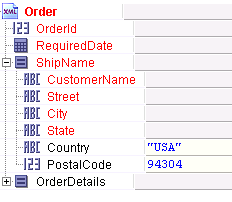
For each element in the activity input schema tree, you can specify a constant. Constants can be strings or numeric values. To specify a string, enclose the string in quotes. To specify a number, type the number into the schema element’s mapping field. The following illustrates specifying the string "USA" for the Country item and 94304 for the PostalCode item of an input schema.
Constants can also be used in functions and search predicates. To learn more about complex XPath expressions that use functions and search predicates, see Chapter 9, XPath.
Date and Datetime Strings in Constants
In constant expressions used in activity input bindings, datetime values are read in according to the ISO 8601 standard, as described in the XML Schema specification. For example, the value:
 
"2002-02-10T14:55:31.112-08:00"
is 55 minutes, 31 seconds and 112 milliseconds after 2pm on February 10th, 2002 in a timezone that is 8 hours, 0 minutes behind UTC.
If no timezone field is present, the value is interpreted in the timezone of the machine that is performing the parsing. This can lead to complications if you are processing data from different timezones, so you are encouraged to always use timezones.
When TIBCO ActiveMatrix BusinessWorks generates datetime strings (for example in the process debugger display for process data), UTC time is always used. The output for the example above is:
 
2002-02-10T14:55:31.112Z
which is the equivalent time in the UTC timezone.

Copyright © Cloud Software Group, Inc. All Rights Reserved