Copyright © Cloud Software Group, Inc. All Rights Reserved


Chapter 9 XPath : The XPath Formula Builder

The XPath Formula Builder
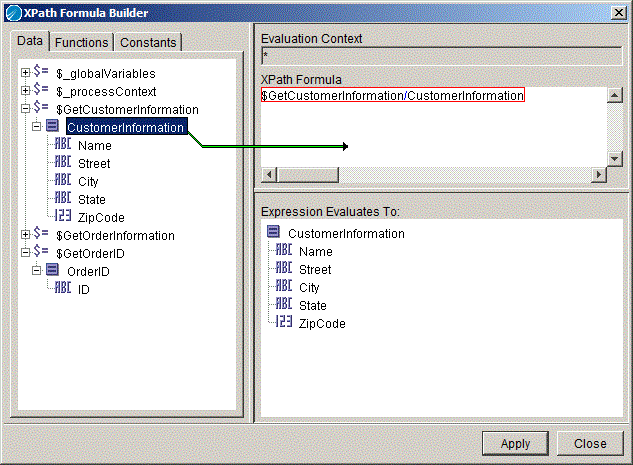
The XPath formula builder can be used where XPath expressions are allowed, such as when creating transformations on the Input tab of an activity. The XPath formula builder allows you to drag and drop schema elements and XPath functions to create XPath expressions. The schema elements, when dragged into the XPath Formula field, automatically become valid XPath location paths for the desired item. If a function is dragged into the XPath formula window, there are placeholders for each parameter of the function. You can drag and drop schema elements over the parameter placeholders to replace each placeholder.
Figure 29 illustrates using the XPath formula builder to drag and drop schema elements into function placeholders.
Figure 29 The XPath formula builder
Table 15 describes the different areas of the XPath formula builder.
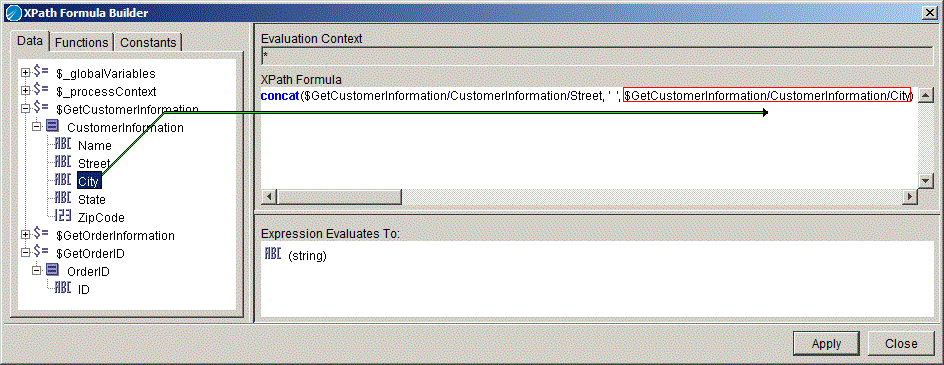
Figure 30 illustrates using the XPath formula builder to create a valid function. The function concatenates the data elements $GetCustomerInformation/Street and $GetCustomerInformation/City and places a space between the two elements.
Figure 30 Creating an XPath formula

Copyright © Cloud Software Group, Inc. All Rights Reserved