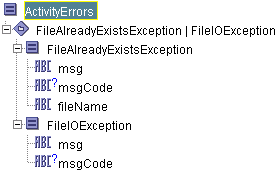
When an error transition is taken, error data is available to activities that execute after the error transition. There are two types of process variables that contain error data, the $_error process variable and the activity error variables. Activity error variables are named
$_error_<activityName>, and all activities that have an error transition are available in the Process Data panel after an error transition is taken. You can use the data in these process variables to perform the desired processing, depending upon what error occurred.
The $_error process variable contains general information about the process in which the error occurred. The schema of the
$_error variable is the following:
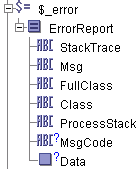
When you create an error-handling procedure, you may find the data in the $_error process variable useful. You can map data from this process variable into Input items for activities in your error-handling procedure.
This activity can encounter the FileAlreadyExistsException or the FileIOException. TIBCO ActiveMatrix BusinessWorks Palette Reference describes the error schemas on the Error Output tab of all activities and lists possible causes for each error type. Refer to the description of each activity for more information about the Error Output tab.
When an error is encountered, the $_error_<activityName> process variable is created and populated with the error data. The name of the process variable is dependent upon the activity’s specified name. You can obtain the error by examining the
$_error_<activityName> process variable in subsequent activities after an error transition. The following illustrates the Process Data panel that is available after the activity named MyCreateFile encounters an error:
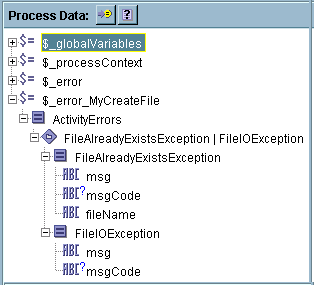
You can use the msgCode element to determine the kind of error that occurred. TIBCO ActiveMatrix BusinessWorks Error Codes lists all error codes that activities can return. You should use the error code instead of the error message text to detect and handle errors. The error code should remain constant from release to release, but the text of the message may change.