Copyright © Cloud Software Group, Inc. All Rights Reserved


Chapter 12 Process Instance Execution : Detecting Duplicate Process Instances

Detecting Duplicate Process Instances
Duplicate messages should be detected and discarded to avoid processing the same event more than once. Duplicate detection is performed when a process instance executes its first Checkpoint activity. You must specify a value for the duplicateKey element in the Checkpoint activity input schema. This value should be some unique key contained in the event data that starts the process. For example, the orderID value is unique for all new orders.
The following describes the procedure for duplicate detection by the process engine:
1.
2.
3.
The process engine checks the current list of duplicateKey values for a matching value.
a.
If no process instance has stored the given duplicateKey value, the process engine stores the value and completes the Checkpoint activity.
b.
If another process instance has already stored the given duplicateKey value, the process engine terminates the process and throws a DuplicateException.
4.
Once a process engine stores a duplicateKey value and performs the Checkpoint for a process instance, no other Checkpoint activities in the process instance can be used to store a different duplicateKey value.
Using the algorithm described above, process engines can guarantee that no newly created or recovered process instances will execute if they have the same duplicateKey value. Therefore, you should take care in choosing the value of duplicateKey and ensure that it will be unique across all process instances.
See TIBCO ActiveMatrix BusinessWorks Administration for more information on specifying process engine storage.
When to Perform Checkpoints
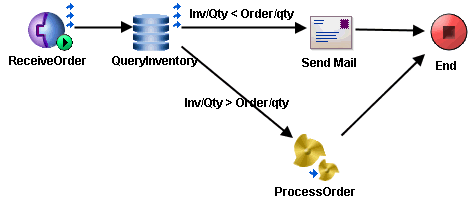
When detecting duplicate messages, it is important to place the Checkpoint activity before any activities that you do not want to execute more than once. For example, consider the following process definition.
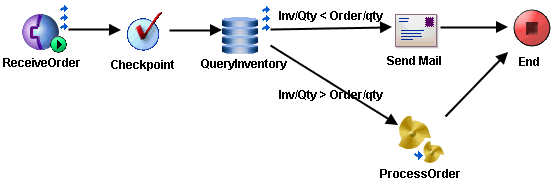
In this process definition, an order is received, inventory is checked, and then either an email is sent to the inventory manager if the inventory is not sufficient, or the order is processed. In this example, you can either place the Checkpoint before the QueryInventory activity (because it is a database query and no actual change occurs) or after the activity but before either the Send Mail or ProcessOrder activities. It is a better choice to put the Checkpoint activity between the process starter and the QueryInventory activities.
The following illustrates the example process definition with the Checkpoint activity properly placed.
Specifying the Duplicate Key
Duplicate detection is only as efficient as the duplicateKey that is specified. You should try to pick a value that is unique for every message. For example, you may select the JMSMessageID header property for JMS messages. In the example in the previous section, orderID is unique for each incoming order, so that would be a good choice for the value of the duplicateKey.
The following illustrates specifying orderID from the example above as the duplicateKey value in the Checkpoint activity.
Transactions and Duplicate Detection
Transaction groups using certain transaction types can allow Checkpoint activities to be performed as part of the transaction. In this case, the checkpoint performed for the transaction may be the first checkpoint in the process definition. If this is the case, you can specify the duplicateKey as part of the transaction group configuration. The duplicateKey is specified in the Checkpoint Duplicate Detection Key field of the transaction group.
Handling Duplicate Messages
When a duplicate is detected, the Checkpoint activity fails with the DuplicateException. You can place an error transition from the Checkpoint activity to a series of activities to handle the duplicate message. If no error transition is specified, the process instance terminates and duplicate messages are effectively ignored.
The following illustrates an error transition added to the example process.
In this example, when a duplicate message is detected, the duplicate message is confirmed so that it is no longer redelivered, then the transition is taken to the end of the process definition.
Process Engine Properties for Duplicate Detection
The following process engine properties control duplicate key detection.
bw.engine.dupKey.enabled — specifies whether duplicate detection is performed.
true (the default) indicates the process engine will check for identical duplicateKey values.
false indicates duplicateKeys when specified are ignored.
bw.engine.dupKey.timeout.minutes — specifies how long (in minutes) to keep stored duplicateKeys. The default is 30 minutes.
0 indicates the duplicateKey is removed when the job is removed. However, if bw.engine.enableJobRecovery=true, the job is not automatically removed after a failure so the duplicateKey will remain as long as the job remains. Such a job can be restarted or purged later.
-1 indicates to store duplicateKey values indefinitely.
Any positive integer greater than 0 indicates the number of minutes to keep stored duplicateKeys.
bw.engine.dupKey.pollPeriod.minutes — specifies the number of minutes to wait before polling for expired duplicateKey values.
See TIBCO ActiveMatrix BusinessWorks Administration for more information about setting process engine properties.

Copyright © Cloud Software Group, Inc. All Rights Reserved