|
|
| Copyright © Cloud Software Group, Inc. All Rights Reserved |
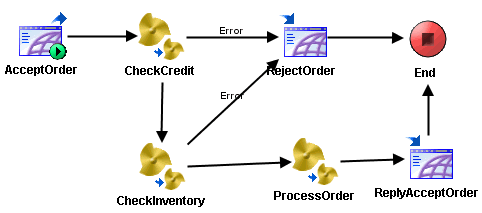
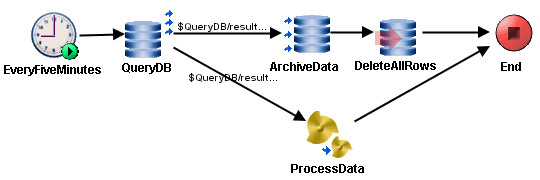
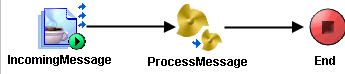
This chapter details examples of using the Sequencing Key field on the Misc tab of process starters to control the order of process execution. For more information on using TIBCO Administrator to set deployment configuration parameters, see TIBCO ActiveMatrix BusinessWorks Administration.In this example, an order-entry system must process incoming orders in the order in which they are received. The orders are placed using a web client and the TIBCO ActiveMatrix BusinessWorks process definition uses an HTTP Receiver process starter to accept the incoming orders. Figure 38 illustrates the example process definition.Figure 38 Example order-entry systemIn this example, you wish to sequentially execute all orders that are accepted by this process definition. To accomplish this, specify a constant in the Sequencing Key field of the Misc tab of the AcceptOrder HTTP Receiver process starter. For example, place "OrderEntry" in the Sequencing Key field. Because you placed a constant in the field, the value of the XPath expression is identical for each incoming order. Therefore, all new orders are executed in the order they are received.In this example, the Timer process starter is used to start a process every five minutes. The process is a monitoring application that examines data in a database and performs the appropriate action. For example, if the number of rows returned by a query is greater than 5000, the process archives the data to another database and removes all rows from the table. If the number of rows is less than 5000, the results of the query are processed and stored in a separate table. Figure 39 illustrates the example process definition.Figure 39 Example of periodic processingTo configure sequential processing in this scenario, you can use the XPath expression pfx:TimerOutputSchema/Day_Of_Month in the Sequencing Key field of the Misc tab of the Timer process starter. This ensures that process instances created each day are completed sequentially in the order they are created. At the end of the day, no updates are occurring to the table, so process instances created at the end of each day can execute concurrently with the first process instance created the next day.Figure 40 Example of handling incoming messagesIn this example, you can use the expression pfx:ActivityOutput/JMSProperties/pfx:JMSXUserID in the Sequencing Key field of the Misc tab of the JMS Topic Subscriber process starter. This ensures that all messages from a specific client are processed in the order they are received.
|
|
| Copyright © Cloud Software Group, Inc. All Rights Reserved |