Copyright © Cloud Software Group, Inc. All Rights Reserved


Chapter 13 Inter-Process Communication : Examples of Inter-Process Communication

Examples of Inter-Process Communication
The following sections describe situations where inter-process communication may be necessary.
Enforcing Order for Process Execution
If you wish process instances to execute in a certain order, you can use Wait and Notify activities to accomplish this. This requires using some portion of the incoming event to determine the order.
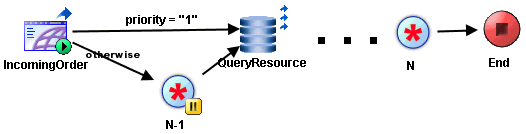
For example, an application may assign a priority number to incoming orders. This may be important when accepting requests for a limited resource, for example, airplane seats or available space in a university class. The orders must be processed in order of priority to ensure that orders with the highest priority number have access to the resource first. Figure 41 illustrates an example process definition that orders incoming events.
Figure 41 Ordering incoming events
In this process definition, new requests are submitted through a web interface. A new process is started for each request, and a priority number (an ordered sequence) is given with each request. The order with priority number 1 is submitted, and processed immediately. When the first order is completed, a Notify is sent with its key set to 1. All other orders transition to the Wait activity. These orders are suspended until a Notify activity is executed whose key is equal to their priority number minus one (that is, the order with the next highest priority number).
Using this technique, orders are processed in the order of their priority, regardless of when the order is submitted. All orders create a process instance and then immediately suspend until the notification is sent from the order with the next highest priority.
Multiple Types of Incoming Events Resume a Running Process
Some processes require a "Wait for..." event (for example, Wait for Adapter Message) to continue processing. This occurs when the process requires an external application to send an additional request.
For example, a new order arrives, and because the total is over $100,000, it requires approval before processing. You may notify a group of approval managers by email, then any of the approval managers can respond by email or through a web interface for approval. Figure 42 illustrates this set of process definitions.
Figure 42 Multiple event sources to continue a process
The Wait/Notify activities use the OrderID as the key to determine the order that corresponds to the notification. In this case, it is possible for more Notify activities to execute than Wait activities. You must configure the Notify activities to have an appropriate timeout so that the notify information is removed if it is not used by the associated Wait activity.
Scalability With Incoming Events
You may distribute incoming events across multiple process engines. This allows for greater scalability because the load of incoming events is distributed. However, "Wait for..." activities, such as Wait for Rendezvous Message are configured on static filters and cannot be configured to filter based on dynamic data. A "Wait for..." activity starts listening from the time the engine is loaded. When you have a "Wait for ..." activity that uses reliable delivery in your process definition, the incoming event is received by all process instances across the multiple process engines. This can potentially affect the performance because of greater network traffic, depending upon how many process instances are running.
Process definitions with "Wait for..." activities running in a multi-engine mode discard the events when an event is not routed to the correct process and may result in the loss of events.
Ideally, you should create some mechanism so that incoming events are handled outside of the process definition and then routed to only the correct process definition. The Wait and Notify activities can accomplish this. You would replace your "Wait for..." activity with a Wait activity. Then, create a new process definition that contains a process starter to handle the incoming event. Use the Notify activity to send the data from the incoming event to the correct process instance with the corresponding Wait activity.
Specific Protocol Requirements
Some business processes use protocols with specific requirements that make inter-process communication necessary. For example, you may have a process that starts when a TIBCO Rendezvous Certified Message (RVCM) arrives. Your process may also require a Wait for Rendezvous Message listening on the same subject as the process starter. This specific configuration is difficult to implement because incoming messages create new processes and also are sent to the waiting activities in the process.
In the example above, the business requirements necessitate working around the requirements of the RVCM protocol. To accomplish this, you may be able to change your business requirements, or you can use the Wait and Notify activities to create two process definitions.
The first process definition accepts all new messages and determines, based on message content, whether the message should start a new process or be passed to an activity in the process waiting for the message. The process executes a Notify activity for the new message, but the key of the Notify is different depending upon whether a new process must start or if the message is to be sent to an executing process. The second process definition starts with a Receive Notification process starter and has a Wait activity in place of the Wait for Rendezvous Message activity. This configuration allows the first process to receive all incoming messages, parse them to determine the appropriate action, and then pass each message to the appropriate process.

Copyright © Cloud Software Group, Inc. All Rights Reserved