Copyright © Cloud Software Group, Inc. All Rights Reserved


Chapter 14 Invoking and Implementing Web Services : The Service Palette

The Service Palette
A service implements one or more interfaces and exposes one or more endpoints per interface. In web service terminology, the interface would be a PortType in a WSDL 1.1 file. The endpoint would be referred to as a port. However, the term endpoint does not imply a physical network address where the service is listening. Services provide an abstraction of web services so that you can implement a more generic service-oriented architecture (SOA) that is not dependent upon a specific transport or implementation. The Service palette contains resources that allow you to define services.
Services decouple the underlying transport from the implementation. You can define an interface you wish to offer, describe the endpoints through which clients can access the service, and specify the implementation for each operation in the service.
In this release of TIBCO ActiveMatrix BusinessWorks, each service can implement any number of interfaces. The endpoints available are SOAP over HTTP, SOAP over JMS and Local.
For example, you may wish to offer a bidding service that implements a Buyer interface. The interface is exposed on the SOAP over HTTP endpoint. The operations contained in the Buyer interface are Bid, Retract, and Raise.
See TIBCO ActiveMatrix BusinessWorks Palette Reference for a detailed description of the resources in the Service palette.
Figure 44 illustrates the service model.
Figure 44 Service model
A service joins an abstract WSDL interface to concrete implementations and exposes them on one or more endpoints. A web service client invokes one of the abstract interface operations using configuration settings provided by the service in the form of concrete WSDL bindings.
Context Separation
Because the Service resource separates the service definition from the transport and the implementation of operations, your implementations may require context information from the underlying request on the specific transport. For example, you may wish to alter processing of the request based on the user ID of the requestor, or you may wish to access the client’s digital signature. The Context resource allows you to define a schema for storing relevant context information.
You can define Context resources, each containing the schema for the data you wish to use. Each operation within a Service resource can then reference a particular Context resource. You can map data from the incoming request (for example, MIME message attachments, authentication and SSL information, and so on) into the elements of the schema defined in your Context resource.
When a Context resource is specified, the data from the incoming request is passed to the implementation defined for an operation. The process definition that implements the operation can use the Get Context and Set Context activities to retrieve or set values for elements within the context.
See TIBCO ActiveMatrix BusinessWorks Palette Reference for more information about the Context resource and the Get Context and Set Context activities.
Configuring a Service
When specifying a Service resource, you must supply the following:
You can also specify other items, such as headers for input and output messages and context information from the client’s request.
Figure 45 illustrates the relationship between the configuration elements of a service and the web service client. The Service palette chapter of TIBCO ActiveMatrix BusinessWorks Palette Reference describes how to configure a Service resource more completely.
Figure 45 Relationship between WSDL, Service, Process, and web service clients
Operation Implementation
In TIBCO ActiveMatrix BusinessWorks, process definitions implement operations. The input, output, and error schemas for the process definition that implements an operation must match the input, output, and fault messages specified for the operation. Figure 46 illustrates the WSDL file and matching process input, output, and error schema specifications for a process definition. See Start Activity and End Activity for more information about specifying input, output, and error schemas for process definitions.
Figure 46 Input, output, and fault messages of operation must match respective schemas of process
 
Running Services
When you deploy and run a project containing a Service resource, a service agent is created for the Service resource. The service agent waits for incoming requests on its specified endpoints and creates process instances to execute the implementation of the requested operation.
For each incoming request, the service agent passes the request’s input message and any specified context information to the process instance that implements the requested operation. The process instance executes and sets the appropriate values in the output message or fault message, if an error occurs. The service agent then sends the output or fault message to the client.
Partners and Partner Link Configurations
Partners are external services that can be invoked from BusinessWorks Process Definitions. Partners are defined by a name and a WSDL portType that describes the operations that can be invoked. The Invoke Partner activity is used within a process definition to invoke an operation on a partner service. The Receive Partner Notification activity is used within a process definition to invoke notification services, where the notification service sends a message that the invoker receives. Partners can be located either inside the same project as the process that invokes the service, or the partner can be an external partner service invoked over the Internet by way of the SOAP protocol.
To define a partner for the process definition, follow this general procedure:
1.
Use the + and X buttons to add or delete partners in the table in the Partners field for a process definition. Move the partners up or down the list using the arrow buttons.
2.
3.
Select a partner, then use the Browse button in the PortType field to locate the appropriate WSDL containing the portType for the partner.
4.
5.
Partner Link Configuration resources associate partners with endpoints. Your service can then correlate partners invoked by the operations with partner link configurations that specify the actual bindings to endpoints.
Instead of specifying the actual endpoint of a partner service in the process definition, you may wish to specify the interface, and then let the service that uses the process bind the interface to the actual endpoint. This allows you to easily change third-party partner services without changing your implementation.
To create a partner link configuration resource, follow this general procedure:
1.
2.
Click the + button to add a new partner. If necessary, use the X button to delete partners or the arrow buttons to move partners up or down the list.
3.
4.
Applying WS-Security Policy for Partner Link Configuration
Endpoint operation of a partner link defined in a Partner Link Configuration resource acts as a security subject and the security policies can be applied to it. There is a unique association between the partner link service endpoint operation security subject and the applied security policies.
The SOAP event source polices are applied at the operation level. The policies applied to a Partner Link Configuration resource are always at the service endpoint operation level.
To apply a policy on a Partner Link Configuration, follow this procedure:
1.
2.
Click the + button to add Partner Link with SOAPEndpoint. If necessary, use the X button to delete partner links or the arrow buttons to move partner links up or down the list.
3.
4.
5.
6.
From the Policy Type drop-down, select inbound.
Follow the similar process of outbound, inbound fault and outbound fault.
7.
Click the Select button to the right of the Apply Policy to field. In the Choose Security Subject dialog box, expand Partner Link Configuration resource and select a service endpoint operation.
8.
Click in the Inbound Message Policy field. In the Select a Resource dialog box, expand Policies and select, Inbound Security Policy, in this case.
Follow the same process for Outbound Message Policy, Inbound Fault Message Policy, and Outbound Fault Policy.
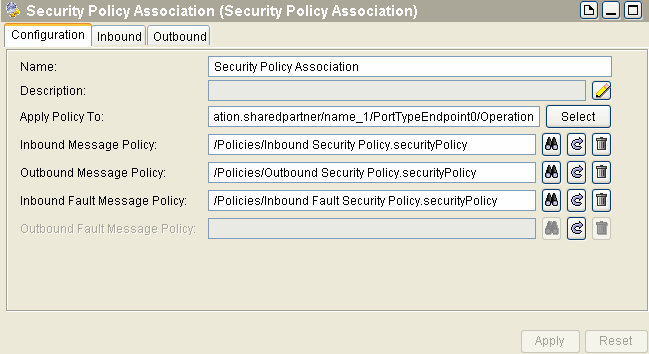
Figure 47 Security Policy Association
 
Apply Policy To - for associating the security policy with the PortTypeEndpoint.
Inbound Message Policy - for applying security policy to the messages being received.
Outbound Message Policy - for applying security policy to the messages being sent.
Inbound Fault Message Policy - for applying security policy to the fault messages being received.
Outbound Fault Message Policy - for applying security policy to the fault messages being sent.
Associating Policies with the Invoke Partner Activity
Invoke Partner activities are bound using the partner links and support the message level security.
Using the service endpoint operation as the security subject ensures consistency in associating the security policies with the service resources. The service resource also exposes the service endpoint operation as a security subject. Exposing partner links as security policy subjects ensures a WS-Security support for all the TIBCO ActiveMatrix BusinessWorks or TIBCO ActiveMatrix BusinessWorks BPEL Expension constructs that use partner links for outbound invocations. This implies that the Invoke Partner activity is WS-Security enabled if, it is bound using a partner link that has a SOAP endpoint.
If a user associates the security policies to a particular partner link service endpoint operation, the WS-Security processing is enabled and performed according to the WS-Security guidelines. All the supported WS-Security constructs must work in context with the partner link service endpoint operation security subject.
Headers for Declared Faults
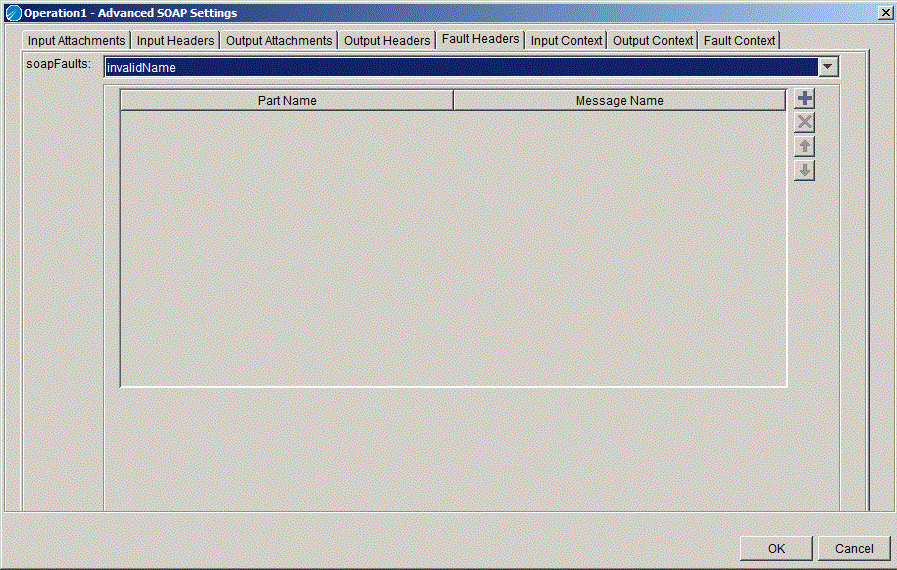
This feature enables the user to configure headers for declared faults. With this the user will be able to configure different schemas to be mapped to the headers for different Fault messages. A Fault Headers tab (Figure 48) has been added to the Advanced SOAP Settings. You can map the context resource values to the configured header using the Fault Headers tab.
Figure 48 Fault Headers
 
Configuring Headers for the Fault Message
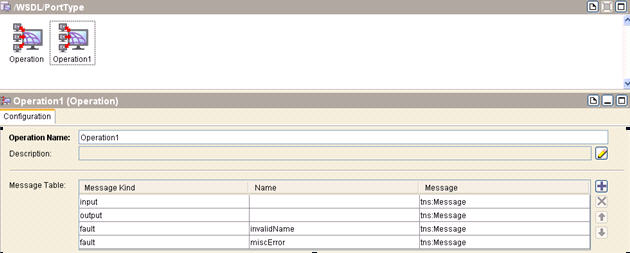
To configure headers for a fault message, as shown in Figure 49, for example, configure headers in the context resource in the same way they were configured in the headers for declared Fault:
Figure 49 Faults Configured in the Service Resource
1.
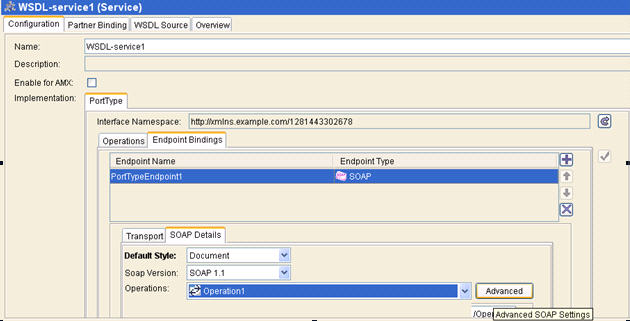
Click "Operation1" to go to the Advanced tab of the Service Resource.
 
Figure 50 Advanced Tab for Configured Fault Message
2.
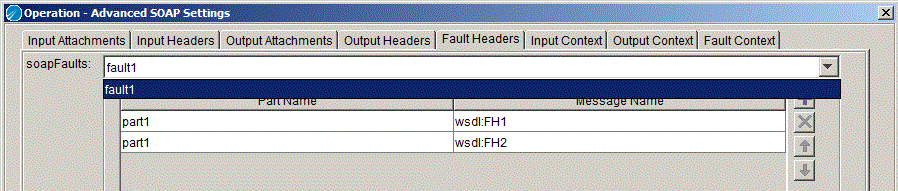
Both the Faults available for that operation are listed in the soapFaults drop-down as shown in Figure 51. Configure the fault message for any of the selected fault. Select the fault header name and Partname of the selected fault same as the Output Headers.
Figure 51 SOAPFault Messages
Configuring Context Resource
The way headers are configured in Headers for Declared Faults, define the Context Resource that can be used to map user inputs to the configured headers.
Figure 52 Context Resource
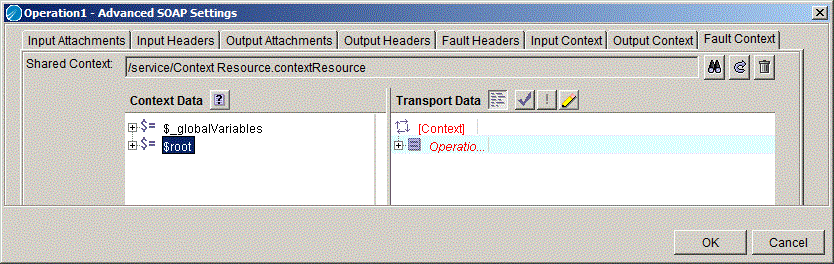
Mappings on the Fault Context Tab
To do mappings on the Context Resource:
1.
Figure 53 Mappings on Fault Context
 
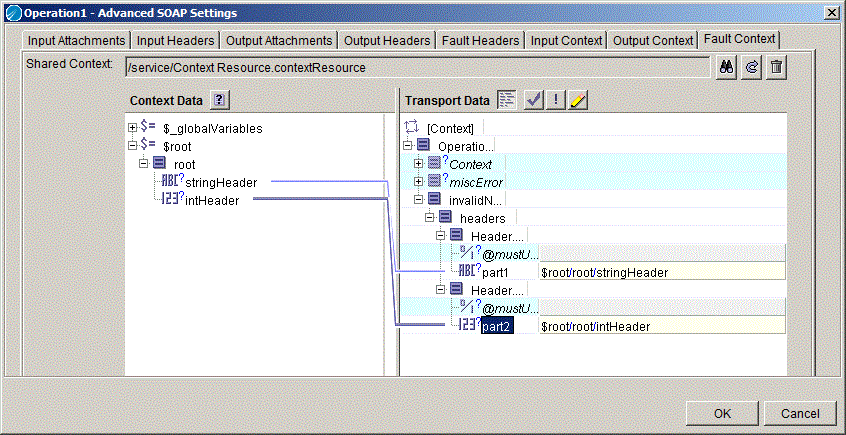
2.
Figure 54 Mapping Configured Headers
 
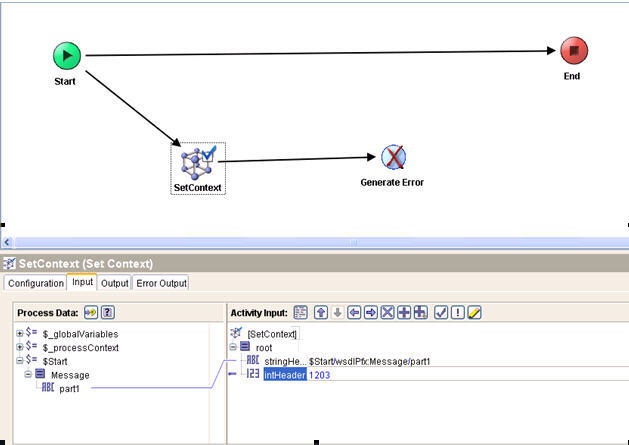
In the Implementation process before sending the invalidName fault, use the Set Context Activity and configure values as shown in Figure 55.
Figure 55 Implementation Process
 
For example, if you configure headers for invalidName fault and use the SetConetxt activity to configure them in the process but select throw miscError fault in the Generate Error activity, then that fault header configuration will be ignored.


Copyright © Cloud Software Group, Inc. All Rights Reserved