|
| Copyright © Cloud Software Group, Inc. All Rights Reserved |
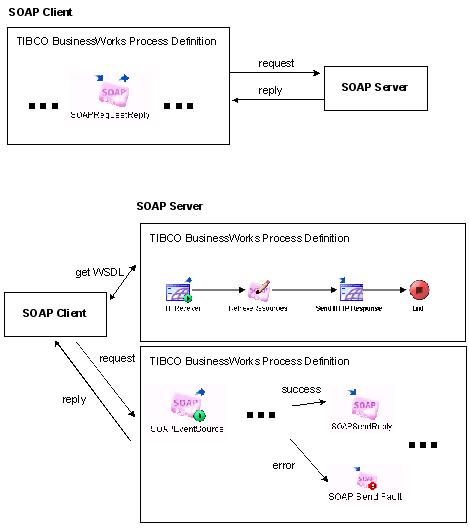
TIBCO ActiveMatrix BusinessWorks can act as a SOAP client and send SOAP requests to remote web services, or TIBCO ActiveMatrix BusinessWorks can act as a SOAP server and handle incoming SOAP requests. Figure 56 illustrates how the activities of the SOAP palette allow TIBCO ActiveMatrix BusinessWorks to send and receive SOAP requests.Figure 56 Activities in the SOAP paletteA TIBCO ActiveMatrix BusinessWorks process definition can perform a SOAP request operation using the SOAP Request Reply activity. In this case, the process acts as a SOAP client that sends a request to a web service. The web service is described in a WSDL file. You can retrieve WSDL files from well-known web service registries. See WSIL Files and UDDI Registries for more information.Once a WSDL file is retrieved, you can store and use the WSDL file in the project. You can view and manipulate the WSDL file with the WSDL palette. See TIBCO ActiveMatrix BusinessWorks Palette Reference for more information.
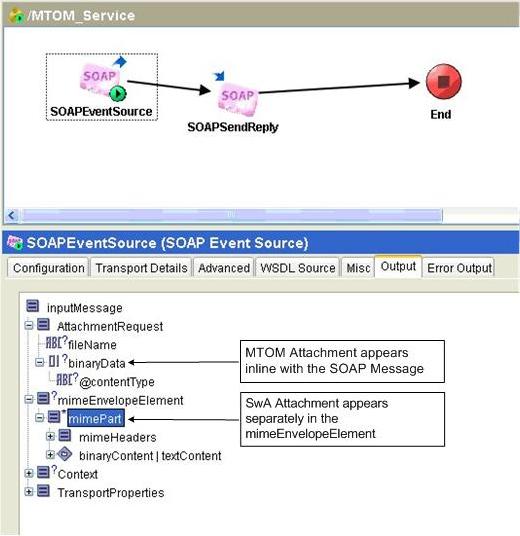
See TIBCO ActiveMatrix BusinessWorks Palette Reference for more information about the resources in the SOAP palette.SOAP messages can have message parts that contain attachments. For a message part to contain an attachment, specify the Special Type in the Type field of the Part Details section of the Message resource when creating a WSDL file configuration. See TIBCO ActiveMatrix BusinessWorks Palette Reference for information about creating WSDL files.SOAP clients that send messages with attachments must conform to the SOAP Messages with Attachments specification (http://www.w3.org/TR/SOAP-attachments).Message Transmission Optimization Mechanism (MTOM) provides another way of sending binary content or attachment processing by serializing SOAP messages with attachments. This is available only with SOAP verion 1.2. Optimization is only available for element content that is in a canonical lexical representation of xs:base64Binary data type. Message Transmission Optimization Mechanism (MTOM) conforms to the specification http://www.w3.org/TR/soap12-mtom.For an outbound SOAP Message with MTOM attachments sent by SOAP Request Reply or SOAP Send Reply activities, any element of type xs:base64Binary (or an extension of xs:base64Binary) in the SOAP response message is treated as an MTOM attachment and appears as a separate MIME part on the wire.Content-ID: <http://example.org/me.png>Content-ID: <http://example.org/my.hsh>Although the attachment is transmitted outside the SOAP message with a reference to it, the attachment appears as if it’s embedded in the SOAP message. The binary content or the attachment is a part of the SOAP Infoset. MTOM-style attachments are available inline with the SOAP message at as shown in Figure 57.Figure 57 MTOM Attachment
"mpwob" stands for "Multi-parts without boundary". As per MIME multipart spec MIME multipart message without a specified boundary is illegal. Setting this property to 'true' provides a mechanism by which a Content-Type header with a mulitpart field, but without a boundary field, will be treated as a body part.
• If the Service Resource is inside nested folders, then set the property to "false" using the following pattern property:
|
| Copyright © Cloud Software Group, Inc. All Rights Reserved |