|
| Copyright © Cloud Software Group, Inc. All Rights Reserved |
TIBCO ActiveMatrix BusinessWorks allows you to specify security policies for inbound and outbound SOAP messages. The security policies follow Web Services Security: SOAP Message Security 1.0 (WS-Security 2004) OASIS Standard 200401. You can find out more about this standard at http://docs.oasis-open.org/wss/2004/01/oasis-200401-wss-soap-message-security-1.0.See TIBCO ActiveMatrix BusinessWorks Palette Reference for more information about the Security Policy Resource.
Security Policy Association shared configuration resources are not referenced by resources in process definitions. Therefore, they are not automatically included in Enterprise Archive files. You must manually add WS Policy Association resources to the Shared Archive within an Enterprise Archive for the associations to work properly in a deployed project. See TIBCO Administrator User’s Guide for more information about adding resources to the Shared Archive.
By default authentication is checked against the usernames and passwords stored in TIBCO Administrator. TIBCO Administrator can also point to an LDAP registry for username/password lookup. If you store usernames and passwords in your own database or LDAP system, you can write your own password callback class that implements the javax.security.auth.callback.CallbackHandler interface.The CallbackHandler implementation must iterate over each Callback object and look for the WSPasswordCallback type. You can use the WSPasswordCallback.getIdentifyer() method to obtain the username. Then you can write code to lookup the password for that username in your system. Once obtained, you must set the password in the Callback object using the setPassword() method.Here is a simple example of a CallbackHandler implementation:For more information about implementing the CallbackHandler interface, see the custom password examples in the BW_HOME/examples/activities/soap directory or see http://java.sun.com/j2se/1.4.2/docs/api/javax/security/auth/callback/CallbackHandler.html.
1. Compile your Callback object into a .jar file.
4. Place your Callback object .jar file into the AliasLibrary resource, and also include any classes that your object depends on (for example, third-party classes for LDAP access). See Chapter 19, Sharing Common Resources with Other Projects for more information about using AliasLibrary resources.
7. In the Custom Password Callback Java Class field, use the Browse button to locate and select the AliasLibrary resource you created in step 4.
8. In the Class field, use the Show Class Browser button to locate and select your Callback object.
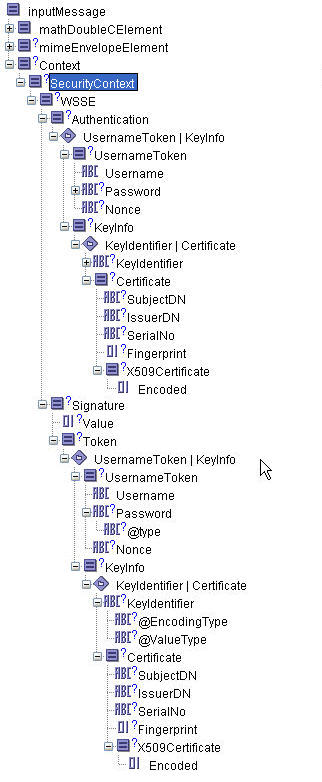
9. Click Apply, then associate your security policy with the desired web services, if you have not already done so.ActiveMatrix Policy Manager sends security information as an XML document, either as part of the header when HTTP transport is used, or as a message property when JMS transport is used. The security information is available under the header com.tibco.security.userinformation.ActiveMatrix BusinessWorks propagates the incoming security context to all outbound invokes by adding the security information as a HTTP header in case of HTTP, or as a JMS message property in case of JMS transport. Figure 66 shows the Authentication Certificate Information and Signature Certificate Information as seen in the Output tab of a SOAP Event Source activity. In this case, the ActiveMatrix Policy Manager had applied the Authentication Signature inbound policy.You can enable security context propagation from TIBCO Policy Manager by selecting the Expose Security Context checkbox available on the Configuration tab of the Service resource or the SOAP Event Source activity using either HTTP or JMS transport.
• Authentication Username Token - For this policy, TIBCO ActiveMatrix BusinessWorks propagates only the Username value. This is because TIBCO ActiveMatrix Policy Manager does not give out the complete Username Token. Instead, it provides only the Username. The password and the Password type values in the security context will be empty.
• Authentication Certificate Information and Signature Certificate Information - For this policy, TIBCO ActiveMatrix BusinessWorks propagates the certificate information, consisting of Subject_DN, Issuer_DN, Serial No and the encoded certificate.Table 22 lists the inbound policies available in Policy Manager and the corresponding policies in ActiveMatrix BusinessWorks.
2. Create a text file named jaas.config and copy the following contents in it.soap_password="#!1Go16wN7zB+OWxx+eTlB/w=="authority="localhost:5443"Where soap_username is the super username of the admin server and soap_ password is the obfuscated password of the above user.You can obtain the username and password information from the AdministrationDomain.properties file located in $TIBCO_Home\tra\domain\<domainName>. The username and password information is provided as a name-value pair with names ’UserID’ and ’Credential’ respectively. If you find any \ in the password, you need to remove them as they are escape characters.authority="localhost:5443" specifies admin servers host and https port.
You can create the jaas.config file in any folder. However, you need to specify the path of the jaas.config file while setting the Java property com.tibco.bw.security.login.jaas in bwengine.xml.
3. Edit the bwengine.xml file and recreate the EAR file before deploying the project.
4. Add the following Java property in bwengine.xml:
• To use non-default location for keystores (that is, the location other than what JRE uses by default, jsr\1.5.0\lib\security\cacerts), add the following properties and set them with appropriate values.java.property.javax.net.ssl.keyStore=C:\Tibco\administrator\domain\<domainName>\SSL\keystorejava.property.javax.net.ssl.trustStore=C:\Tibco\administrator\domain\<domainName>\SSL\keystorewhere ’password’ specifies the default admin keystore password.
5. Enable the JAAS authentication by adding the following property in the bwengine.xml file:Following are the JAAS login properties that can be set in bwengine.xml. You can refer to these properties while configuring JAAS login:
|
| Copyright © Cloud Software Group, Inc. All Rights Reserved |