Copyright © Cloud Software Group, Inc. All Rights Reserved


Chapter 18 Testing Process Definitions : Process Instances During Testing

Process Instances During Testing
The Start Testing Viewed Process button allows you to create a process instance for the currently viewed process definition and all of its dependent subprocesses. You can also select other process definitions to load as well.
If the loaded process begins with a Start activity that requires input, you can supply input to the process starter by clicking on the Supply Input Data to Starter button on the TIBCO Designer toolbar. This button is not available for processes that do not require input data on the Start activity.
Loading Processes to Test
Once the Start Testing Viewed Process button is clicked, the Select Processes to Load dialog appears. You can select the process definitions you wish to load into the test engine in this dialog.
The Advanced button on this dialog allows you to specify any arguments to use when starting the test engine. This is useful if you wish to specify a property file containing custom engine properties. See TIBCO ActiveMatrix BusinessWorks Administration for more information about specifying custom properties in a test engine.
You can also specify a database to use for storage of process engine information. The Test Engine Database field specifies the JDBC Connection resource to the database you wish to use.
Creating Process Instances
If the loaded process begins with a Start activity, one process instance is created to execute the process definition. Processing continues until the End activity is reached.
If the loaded process begins with a process starter (for example, Adapter Subscriber), the process engine waits for an incoming event before creating a process instance. Each incoming event causes a process instance to be created, and each process instance is listed in the test panel. You can select any process instance in the test panel and view it in the design panel.
You can create new process instances of any loaded process using the Create a Job button in the test panel. Select a process definition in the test panel, then click the Create a Job button. A new process instance for that process definition is created.
You can also select and right-click on a process definition name in the test panel to bring up a popup menu. This menu contains the item Create a Job that performs the same function as the button on the test panel toolbar.
Working With Process Instances
Each process instance is independent in the test panel. You can start/stop/step through each process instance individually.
When a process instance is running, its description is (running) in the test panel. Once a process instance completes its processing (that is, its End activity is reached), its description is changed to (completed job) in the test panel. If a process instance fails to complete, its description is changed to (failed). You can view any running, completed, or failed job.
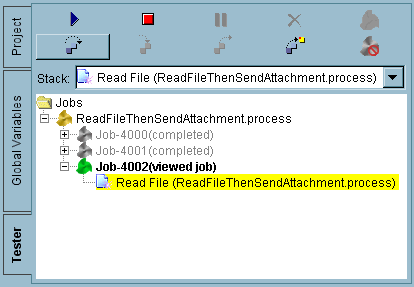
When a job is selected in the test panel, its process definition is displayed in the design panel and its description changes from (running), (completed job), or (failed) to (viewed job). Figure 73 illustrates process instances and their labels in the test panel.
Figure 73 Multiple process instances in the test panel
You can stop the execution of a process instance by selecting it and clicking the Stop the Current Job button in the test panel.
You can delete any completed or failed process instances from the test panel by selecting the process instances and clicking the Delete a Completed Job button .

Copyright © Cloud Software Group, Inc. All Rights Reserved