|
| Copyright © Cloud Software Group, Inc. All Rights Reserved |
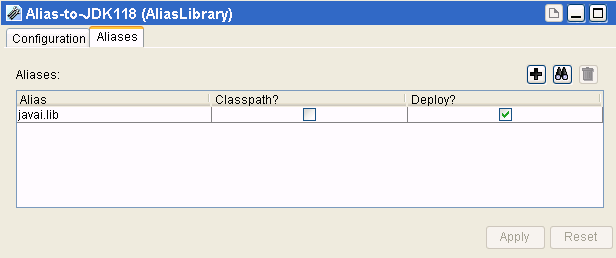
The AliasLibrary resource is crucial for resources that depend on external files, such as the Java Activity in TIBCO ActiveMatrix BusinessWorks. Resources in your project can reference aliases in the AliasLibrary to resolve external file dependencies that they may have at runtime or debug time.When you build an enterprise archive file, the files referenced by the aliases defined in an AliasLibrary that you include in your project are included in your archive file. The next diagram shows the AliasLibrary resource.
1. Select the top-level folder and locate the AliasLibrary resource.In palette mode, this resource is in the General palette.
2. Drag the AliasLibrary resource into the design panel.The AliasLibrary is displayed in the design panel, and the configuration panel now allows you to supply information about the library.
3.
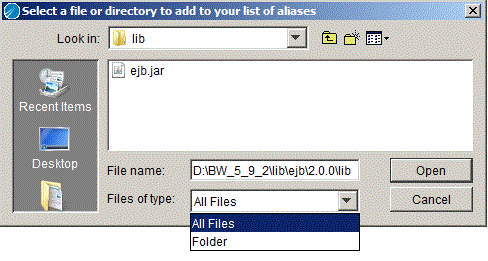
4. Click the Aliases tab.A warning appears if the folder of file you select exceeds a certain size. The warning can be customized. See TIBCO ActiveMatrix BusinessWorks Administration for more information.Click theicon to select a previously defined Alias entry to add to the library. Aliases are managed under the File Aliases tab in the TIBCO Designer Preferences dialog. Click Edit > Preferences to access the dialog.
Theicon allows you to delete selected entries in the AliasLibrary. Note that the entry is removed from the AliasLibrary. The alias is still available from the preferences dialog.
5. You can specify whether aliases within the AliasLibrary should be included in the CLASSPATH, deployed with the enterprise archive file, or both. This may be required for a TIBCO ActiveMatrix BusinessWorks Java Activity that loads a jar file in order to find its executable or supporting code.
− If you select the Classpath check box, the jar file or file represented by the alias is placed in the CLASSPATH when the enterprise archive file is built. Note that, at design-time, the referring resource is responsible for loading these entries itself. Designer does not perform anything with the configuration other than building the enterprise archive file.
− If you select the Deploy check box, the associated file is deployed. If the deploy check box is clear, the file is not deployed. This allows a Java Activity to specify that a support jar file is required in the CLASSPATH, but should not be deployed (the jar may already be available as part of a separate configuration at runtime, but may be required during debug time).
6. Click Apply.
|
| Copyright © Cloud Software Group, Inc. All Rights Reserved |