Accessing the BWAgent REST API with the Swagger UI
Use the Swagger UI to access the BWAgent REST API, where you can try out operations and see results using sample data.
- Procedure
- Start the BWAgent with the
apiservercommand:BW_HOME\bin>bwagent apiserverThe API server is started at
http://<hostname>:5555, where <hostname> is value you have set for the bw.agent.http.host property in thebwagent.inifile. For example, if you set localhost as the value for the bw.agent.http.host property, the API server is started at the URLhttp://localhost:5555. - Open a web browser and go to the URL of the API server.
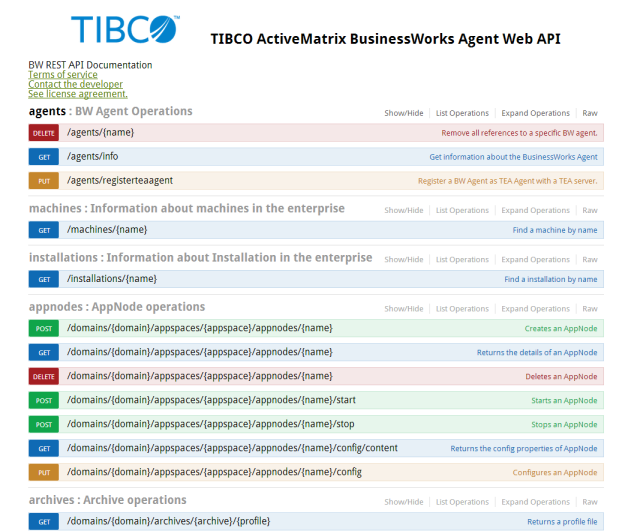
The BWAgent API documentation displays in the Swagger UI:
- View sample data in the browser. To obtain the URL, go to the URL returned by an operation. For example, clicking
Try it out! for the
GET/agents/infooperation returns the Request URL ofhttp://localhost:5555/api/agents/info. Pasting this URL into the browser returns information similar to:[{"name":"localhost","state":"Running","version":"6.6.0","configState":"InSync","machineName":"bwin2k12r264b-76","description":"TIBCO ActiveMatrix BusinessWorks version 6.6.0, build V37, 2019-10-13","adminMode":"enterprise","tibcoHome":"E:\\BW6\\6.6.0\\V37","pid":"5024","installationName":null,"configMap":null,"httpPort":null,"httpHost":null,"uptime":10986,"internalPort":null}]Note: To get actual data for the agent, go to the URL using the port 8079 instead of 5555. Change theapifolder in the file path tobwand the version number into the path before the resource. (The BWAgent must be running.) For example, the URLhttp://localhost:8079/bw/v1/agents/inforeturns the following information for an agent named MACHINE_1:[{"name":"localhost","state":"Running","description":"TIBCO ActiveMatrix BusinessWorks version 6.6.0, build V37, 2019-10-13","tibcoHome":"E:\\BW6\\6.6.0\\V37","pid":"3356","configState":"InSync","machineName":"localhost","adminMode":"enterprise","version":"6.6.0","installationName":"V37","configMap":{"bw.agent.technology.requestTimeout":"60000","bw.agent.technology.dbftl.ftl.dataformat":"bw-format","bw.agent.technology.type":"dbftl","bw.governance.jms.ssl.trust.store.location":"","bw.agent.tea.agent.port":"9091","bw.agent.technology.dbftl.db.password":"bwpassword","bw.agent.technology.dbftl.db.driver":"com.mysql.jdbc.Driver","bw.monitor.ftluserpassword":"","bw.governance.jms.ssl.trust.store.type":"JKS","bw.monitor.data.format":"bytestream","bw.agent.technology.dbftl.db.connectionURL":"jdbc:mysql://localhost:3306/V37","bw.monitor.ftlidentifier":"","bw.agent.tea.server.url":"http://%HOSTADDRESS%:8777/tea","bw.monitor.ftlendpoint":"bwadmin-stats-endpoint","bw.agent.technology.statsProvider.db.driver":"com.mysql.jdbc.Driver","bw.agent.http.port":"8079","bw.monitor.ftlinbox":"bw-inbox","bw.governance.jms.server.password":"","bw.agent.technology.statsProvider.db.connectionURL":"jdbc:mysql://localhost:3306/V37","bw.monitor.ftldataformat":"bw-format","bw.agent.technology.statsProvider":"db","bw.agent.http.host":"0.0.0.0","bw.monitor.ftlapplicationname":"bwadminstats","bw.agent.technology.dbftl.ftl.inbox":"bw-inbox","bw.agent.http.access.log.config":"bwagent-access.xml","bw.admin.mode":"enterprise","bw.agent.technology.dbftl.ftl.endpoint":"bwadmin-endpoint","bw.governance.jms.server.url":"tcp://localhost:7222","bw.agent.technology.dbftl.ftl.secondary":"","bw.agent.appnode.password":"OBF:1sho1wgi1u9d1x1d1xfj1x191ua51wfg1shu","bw.agent.technology.dbftl.ftl.username":"","bw.governance.jms.reconnect.attempt.delay":"500","bw.agent.memberName":"localhost","bw.governance.jms.server.username":"admin","bw.monitor.ftlusername":"","bw.agent.technology.dbftl.db.userName":"bwuser","bw.monitor.ftlsecondaryurl":"","bw.agent.technology.dbftl.db.provider":"mysql","bw.agent.technology.dbftl.ftl.realmserver":"http://localhost:8070","bw.monitor.provider":"UDP","bw.monitor.ftlrealmserverurl":"http://ip[:port]","bw.governance.jms.reconnect.attempt.timeout":"500","bw.agent.technology.statsProvider.db.userName":"bwuser","bw.governance.jms.queue.pd.receiver.name":"governance.de.bw.default","bw.agent.tea.agent.host":"0.0.0.0","bw.agent.technology.dbftl.ftl.password":"","bw.agent.technology.db.create.schema":"true","bw.governance.jms.reconnect.attempt.count":"120","bw.governance.jms.ssl.trust.store.password":"","bw.agent.networkName":"BW6Network","bw.governance.enabled":"false","bw.agent.technology.statsProvider.db.provider":"mysql","bw.agent.technology.statsProvider.db.password":"bwpassword","bw.agent.technology.dbftl.ftl.application":"bwadmin","bw.agent.technology.dbftl.ftl.identifier":""},"httpPort":8079,"httpHost":"0.0.0.0","uptime":11850866,"internalPort":56565}]To change the URL interface or port, edit the
http.hostorhttp.portsettings in thebwagent.inifile.