Backing Up and Restoring a Domain
Backing up a domain exports the current state of the specified domain and contained runtime entities to a BWAdmin command file. The entire domain is backed up, including remote BWAgents, if applicable to the specified domain. The command file can be provided to BWAdmin to recreate the domain. Output can be compressed to a ZIP file with the
-zipped option.
BWAdmin Command Line
- Procedure
- To back up the current state of a domain, including profiles and archives, enter the
backupcommand at the command line, using the-soption to identify the name of the destination file. Use thedomainargument in the command line, with the name of the domain to back up. The domain can be either a local domain or a domain in a BWAgent in the agent network. By default, destination files are written to the current working directory.This example backs up domainMachine2Domainin a networked BWAgent to a command file namedmachine2_domain.cmd.Note: Use the-noarchivesoption to exclude archives uploaded to the domain from the backup. The references to the archives are included in the destination file. If needed, the paths in the destination file can manually be added to include archives in the restore.The syntax is as follows where
-nainvokes the no archive option, and-zcreates a zip file.backup -na -z -s C:/Backup/archives.zip domain Domain_Namebackup -na -s C:/Backup/archives.cmd domain Domain_NameBW_HOME\bin>bwadmin backup -s machine2_domain.cmd domain Machine2DomainIf you are restoring to a different location, you need to update the command file as follows:
- The agent name points to
localhostby default. You need to change this to the name of the machine that you are restoring to. - Update the domain home to point to the absolute path to the new location.
- Update the path to the application archive (EAR) file to an absolute path.
- The agent name points to
- To restore the domain,
- Enter the
BWAdmincommand, providing the name of the backup command file. The following example recreates the domainMachine2Domainand the contained runtime entities.BW_HOME\bin>bwadmin -f machine2_domain.cmd - Use the
bwadmin show domainscommand from the command line to verify the restore.
- Enter the
Admin UI
- Procedure
- Click the down arrow for the domain on the
Domain Management page and choose
Backup.
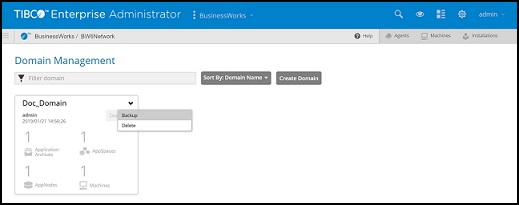
- Click
Backup in the
Backup domain dialog.
- To exclude archives from the backup, check the Do not back up Application Archives in this domain option.
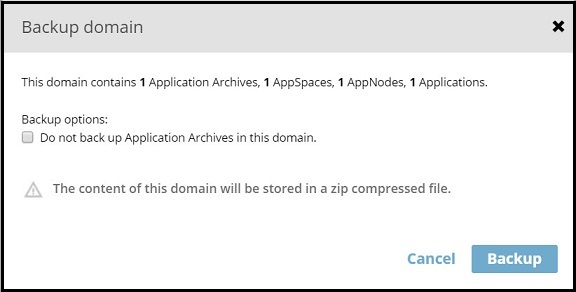
The contents of the domain are written to a ZIP file that is downloaded to your computer. The filename is in the format:
Domain_backup_domainName.zipThe ZIP file contains a.cmdfile that can be used to restore the environment.