Accessing Samples
You can access the samples in TIBCO Business Studio™ for BusinessWorks™ from the File Explorer view.
- Procedure
- Open
TIBCO Business Studio™ for BusinessWorks™ from
$TIBCO_HOME\studio\<version>\eclipse\TIBCOBusinessStudio.exe.
By default, TIBCO Business Studio™ for BusinessWorks™ opens the Design perspective.
- Click
.
The Welcome screen is displayed with various available samples, for example, REST Bookstore - Basic, REST Bookstore - Database, Order Processing.
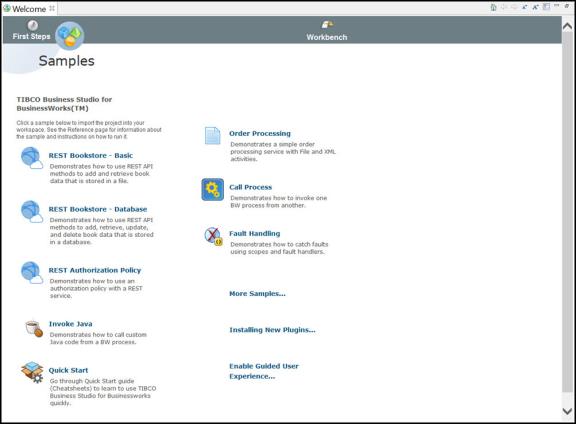
- Select the required sample.
The File Explorer view displays a top-level listing of all the samples.Note: If the workspace is from an older version, you need to locate the samples manually using the Open Directory to Browse button available on the File Explorer view. TIBCO Business Studio™ for BusinessWorks™ stores the samples at tibco-home/bw/6.6/samples.
- Navigate to the directory containing the sample that you want to access and do the following:
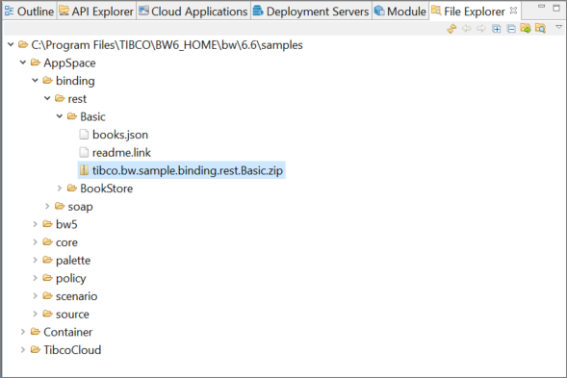 Double-click the archive file, <sample_name>.zip, to import the sample application to your workspace. For example, double-click tibco.bw.sample.binding.rest.Basic.zip to import the application and the application module to your workspace. Alternatively, you can right-click the required project folder and click Import Selected Projects option to import the required application.Click readme.link to open the sample Help page in the Reference - online view. For example, by clicking you can access the help page for a Basic REST Sample application. You can access the help page of all samples by following the same procedure.