Custom Tags for OpenTelemetry
For OpenTelemetry, you can add custom tags. To add custom tags, use the Tags tab added in each activity in TIBCO Business Studio for BusinessWorks.
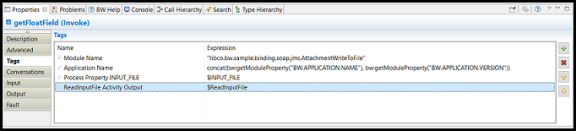
You can add Expression such as hard-coded values and XPath expressions for custom tags.
At run time, an asterisk (*) prefix is added for the names of the custom tags. It avoids overriding of the predefined engine tags.
Two new properties have been introduced to control the behavior of OTEL custom tag prefixes:
bw.engine.clear.otel.tag.prefix Boolean (true/false) Default: false
- bw.engine.override.otel.tag.prefix String
| Configuration | Resulting Behavior |
|---|---|
| No properties set | Existing behavior is retained (default * prefix). |
| bw.engine.clear.otel.tag.prefix=true only | Prefix is cleared (no prefix applied). |
| bw.engine.override.otel.tag.prefix= only | Custom prefix is applied. |
| Both set (clear=true and override=) | Prefix is cleared. The clear property takes precedence over the override property. |
The clear property (bw.engine.clear.otel.tag.prefix) has higher priority. If enabled, it will always clear the prefix, even if a custom override value is provided.
- If neither property is defined, the system continues with the existing default behavior (* prefix).