Using Azure Vault for Credential Management Service
Azure Key Vault is a tool for securely storing and accessing secrets.
A new
Azure Vault provider is added for the credential management for the property of type password.
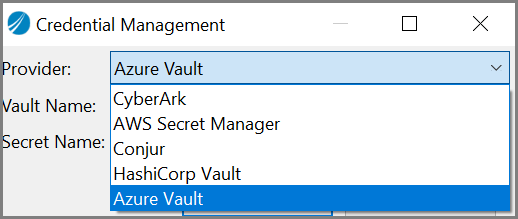
The Azure Vault has two fields:
- Vault Name: Name of the vault.
- Secret Name: Path of the Secret.
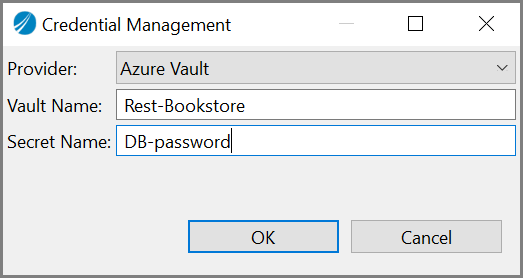
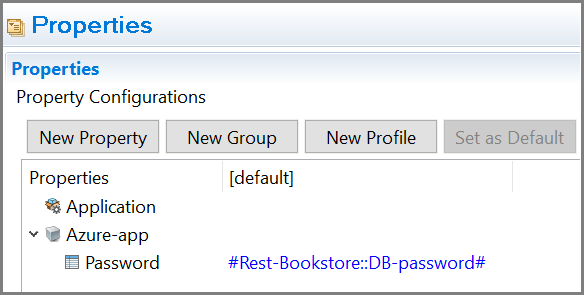
On
TIBCO Business Studio for BusinessWorks, the format is stored as
#<AZURE_VAULT_NAME>::<AZURE_SECRET_KEY>#.
You can use Azure Vault as a credential management service for module properties. When using it to export the profile as a properties file, the property value uses the following format:
AzureVault::vaultName::secretKey
TIBCO Business Studio for BusinessWorks supports two authorization methods to connect to the Azure Vault:
- Service principle and secrets
- Managed identities for Azure resources
To enable the Azure Vault credential management system, pass the following environment variables at runtime:
For Service principle and secrets
- AZURE_VAULT
- APP_CONFIG_PROFILE
- AZURE_CLIENT_ID
- AZURE_CLIENT_SECRET
- AZURE_TENANT_ID
For Managed identities for Azure resources
- AZURE_VAULT
- APP_CONFIG_PROFILE
config.ini file. For more information, see System Properties for AppNode.