Using HashiCorp Vault for Credential Management Service
HashiCorp Vault is used to integrate with ActiveMatrix BusinessWorks for the credential management system to retrieve passwords from the vault to use them within the application at runtime when the password is required. This avoids adding any passwords in the deployment configuration and redeploying the application.
A new
HashiCorp Vault provider is added for the credential management for the property of type password.
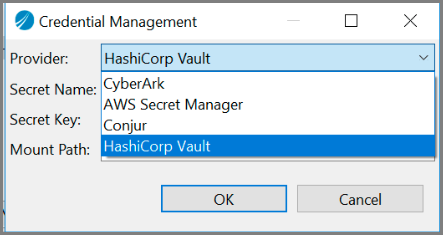
HashiCorp Vault has the following fields:
- Secret Name: Path of the secret.
- Secret Key: Key of the secret in the KeyValue engine.
- Mount Path: Path where the KeyValue engine is enabled.
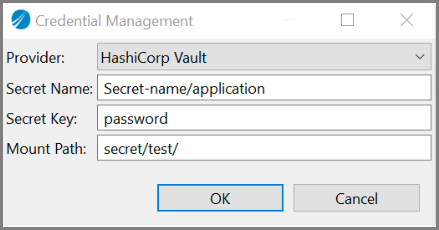
On
TIBCO Business Studio for BusinessWorks, the format is stored as
#Secret_Name::Secret_key::Mount_Path#
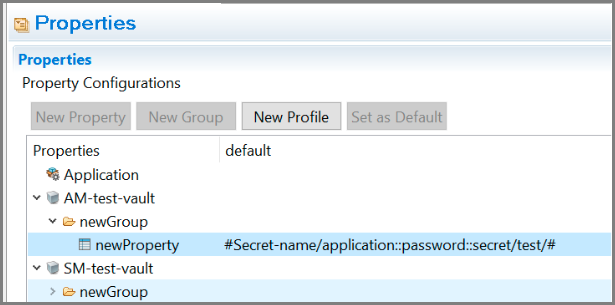
You can use HashiCorp Vault as a credential management service for module properties. When using it to export the profile as a properties file, the property value uses the following format:
HashiCorpVault::secretName::secretKey::mountPath
To enable the HashiCorp Vault credential management system, pass the following environment variables at runtime:
- HASHICORP_VAULT_ADDR
- HASHICORP_VAULT_AUTH
- VAULT_AUTH_PATH
- HASHICORP_VAULT_KV_VERSION
- APP_CONFIG_PROFILE
To use the name of the namespace, pass the HASHICORP_VAULT_NAMESPACE environment variable.
config.ini file. For more information, see System Properties for AppNode.The authentication methods supported for HashiCorp Vault are Token, AppRole, and Userpass.
| Authentication Method | Description | Environment Variables to enable the Authentication Method |
|---|---|---|
| Token | This authentication method enables users to authenticate using a token. | HASHICORP_VAULT_TOKEN |
| AppRole | This authentication method enables machines or applications to authenticate with vault-defined roles. The default path is approle/.
|
If this authentication method is enabled at a different location, the following environment variables are used to enable this authentication method:
|
| Userpass | This authentication method enables users to authenticate with the vault using username and password combinations. The username and password combinations are configured directly to the authentication method with the users or path. |
|
For example, instead of passing username and password as plain text, you can encrypt the string and pass the string as an environment variable using the BWOfuscator Utility. For more information, see Password Obfuscator Utility.
Secrets engines are components that store, generate, or encrypt data. Some secrets engines simply store and read data while others connect to services and generate dynamic credentials on demand. Other secrets engines also provide encryption as a service. Secrets engines are enabled at a "path" in the Vault. When a request comes to the Vault, the router automatically routes anything with the route prefix to the secrets engine. The supported secrets engine is the Key Value Engine.
The KeyValue (KV) engine is the supported secret engine for HashiCorp Vault. The default engine used is the KeyValue (KV) engine version 2. If the HASHICORP_VAULT_KV_VERSION environment variable is set to 1, KeyValue (KV) engine version 1 is used.