Integrating Execution Statistics Collection Using Logback
Edit the logback.xml to integrate execution statistics collection.
- Procedure
- Upload and deploy the application to an AppNode.
- To enable activity execution statistics and process execution statistics, run the following commands from the Admin CLI:
enablestats activityinstance appnameappversion
enablestats processinstance appnameappversion
- To disable activity execution statistics and process execution statistics, run the following commands from the Admin CLI:
disablestats activityinstance appnameappversion
disablestats processinstance appnameappversion
- To retrieve execution statistics for a specific process, run the following command from the Admin CLI:
enablestats -bp processname processinstance appnameappversion
- To retrieve execution statistics for a specific activity in a specific process, run the following command from the Admin CLI:
enablestats -bp processname -ba activityname activityinstance appnameappversion
- By default, statistics are collected in the following files:
- Activity statistics: AppNode_root/stats/activitystats.csv
- Process statistics: AppNode_root/stats/processstats.csv
- To customize activity statistics collection, go to
AppNode_root/logback.xml and configure the following appender:
<appender name="activityStatsFileAppender" class="ch.qos.logback.core.rolling.RollingFileAppender"> <File>../log/activitystats.log</File> <encoder> <Pattern>%msg%n</Pattern> </encoder> <rollingPolicy class="ch.qos.logback.core.rolling.TimeBasedRollingPolicy"> <FileNamePattern>../log/activitystats.%d{yyyy-MM-dd}.log</FileNamePattern> </rollingPolicy> </appender> <logger name="com.tibco.bw.statistics.activity" additivity="false"> <level value="INFO"/> <appender-ref ref="activityStatsFileAppender" /> </logger>- To write the log as a formatted HTML file, add the following file appender to the APPENDER: File Appender section of the
logback.xml file.
<appender name="activityStatsFileAppender" class="ch.qos.logback.core.FileAppender">
<File>../log/activitystats.html</File>
<encoder class="ch.qos.logback.core.encoder.LayoutWrappingEncoder">
<layout class="com.tibco.bw.logback.layout.ActivityExcecutionStatsHTMLLayout"/>
</encoder>
</appender>

<logger name="com.tibco.bw.statistics.activity" additivity="false">
<level value="INFO"/>
<appender-ref ref="activityStatsFileAppender" />
</logger>
- To write the log as a formatted HTML file, add the following file appender to the APPENDER: File Appender section of the
logback.xml file.
- To customize process statistics collection, go to
AppNode_root/logback.xml and configure the following appender:
<appender name="processinstanceStatsFileAppender" class="ch.qos.logback.core.rolling.RollingFileAppender">
   <File>../log/processinstancestats.log</File>
     <encoder>
       <Pattern>%msg%n</Pattern>
     </encoder>
   <rollingPolicy class="ch.qos.logback.core.rolling.TimeBasedRollingPolicy">
      <FileNamePattern>../log/processinstancestats.%d{yyyy-MM-dd}.log</FileNamePattern>
   </rollingPolicy>
</appender>

<logger name="com.tibco.bw.statistics.processinstance" additivity="false">
  <level value="INFO"/>
  <appender-ref ref="processinstanceStatsFileAppender" />
</logger>
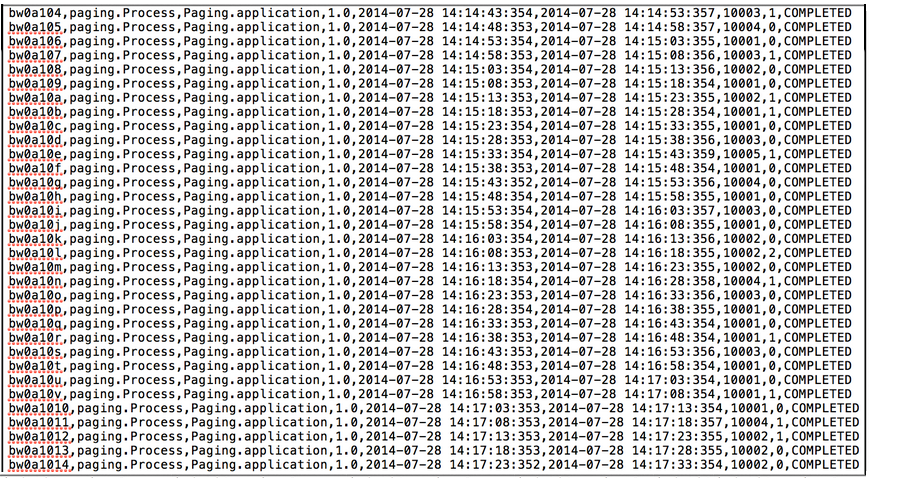
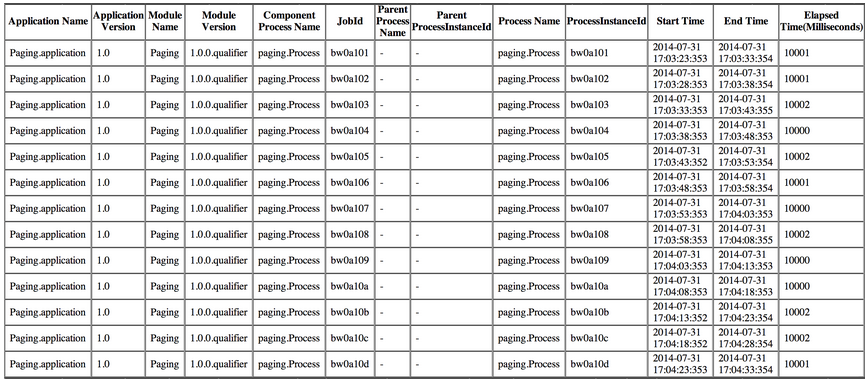
Results look similar to this:
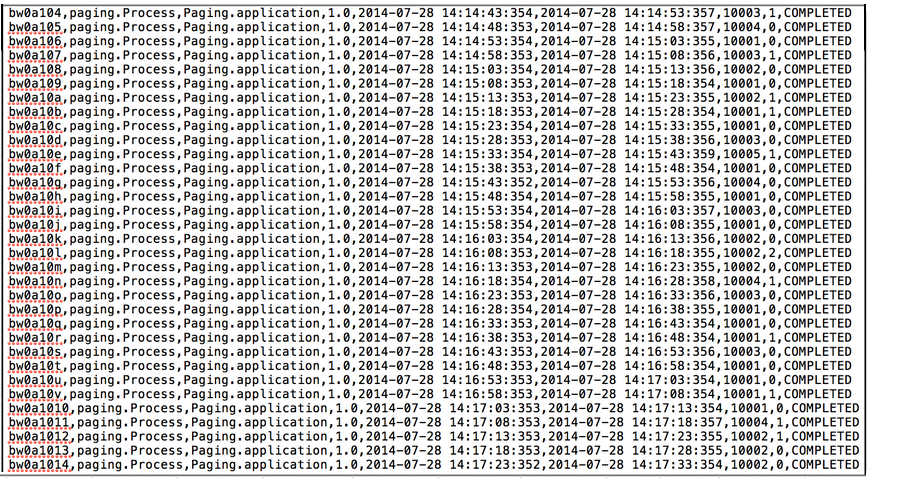
- To write the log as a formatted HTML file, add the following file appender to the
APPENDER: File Appendersection of the logback.xml file.<appender name="processinstanceStatsFileAppender" class="ch.qos.logback.core.FileAppender"> <File>../log/processinstancestats.html</File> <encoder class="ch.qos.logback.core.encoder.LayoutWrappingEncoder"> <layout class="com.tibco.bw.logback.layout.ProcessInstanceStatsHTMLLayout"/> </encoder> </appender> <logger name="com.tibco.bw.statistics.activity" additivity="false"> <level value="INFO"/> <appender-ref ref="processinstanceStatsFileAppender" /> </logger>Results look similar to this:
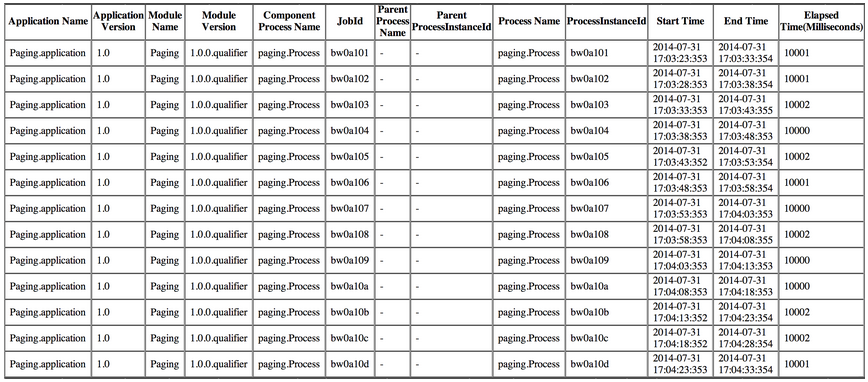
- To write the log as a formatted HTML file, add the following file appender to the
- Create a table in the database using following script or use an existing one.
create table PROCESS_INSTANCE_STAT_TABLE (APPLICATION_NAME varchar(255),APPLICATION_VERSION varchar(255),MODULE_NAME varchar(255),MODULE_VERSION varchar(255),COMPONENT_PROCESS_NAME varchar(255),JOBID varchar(255),PARENT_PROCESS_NAME varchar(255),PARENT_PROCESS_INSTANCEID varchar(255),PROCESS_NAME varchar(255),PROCESS_INSTACEID varchar(255),START_TIME varchar(255),END_TIME varchar(255),ELASPED_TIME varchar(255),EVAL_TIME varchar(255),STATUS varchar(255));
Statistics is written either in the database or in the .csv file, but not both. If statistic is to be written in .csv, you need to putstatsprovider=falsein the bwagent_xxx.json file, and re-push the configuration to the bwaget.ini file.