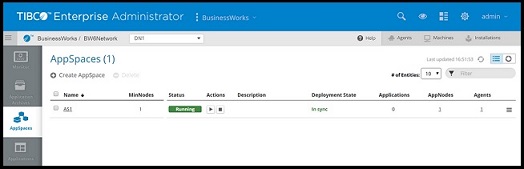
Viewing AppSpace States
An AppSpace has two states: Deployment and Runtime.
The Deployment state can have the following statuses:
| Status | Description |
|---|---|
| In-Sync | The AppSpace is synchronized with its bwagents. |
| Out-of-Sync | The AppSpace is out of synchronization. The out-of-sync state may occur when:
|
The Runtime state can have the following statuses:
| Status | Operations Allowed in This Status | Description |
|---|---|---|
| Running | Stop |
The minimum threshold of AppNodes configured for this AppSpace are running. |
| Stopped | Start, Delete |
None of the AppNodes configured for this AppSpace are running. |
| Degraded | Stop |
The number of AppNodes for this running AppSpace falls below the minimum specified threshold.
Note: The state also occurs when the AppSpace is not running.
|
Note: Note: AppSpaces do not have a starting state. However, AppNodes have their own lifecycle and may go from starting to stopped.
bwadmin Command Line
To view the status of the AppSpace MyAppSpace in the domain MyDomain, execute the following command at the command line:
BW_HOME\bin>bwadmin show -domain MyDomain appspace MyAppSpace
Admin UI
Navigate to the AppSpace page and view the Status column.