Invoking a Microagent Method
After deploying TIBCO Hawk Plug-in for TIBCO Administrator, you can access the microagent methods for a running service instance in different ways:
| • | In the Monitoring Management > Hawk console, select the appropriate domain, the appropriate agent in the Agents tab, and the appropriate microagent for the running service instance. |
| • | In the Monitoring Management > Hawk console, select the appropriate domain, the appropriate agent in the Microagents tab, and the appropriate microagent for the running service instance. |
| • | In the Application Management module, from either the All Service Instances console or the Service Instances console of the application, select the running service instance, and click the Methods tab. |
| • | In the Resource Management module, select the appropriate machine, the appropriate microagent in the Agent tab. |
The following figure shows the available methods of an adapter microagent displayed in the Microagent dialog from the Hawk console:
Figure 127: Hawk Console - Microagent Dialog
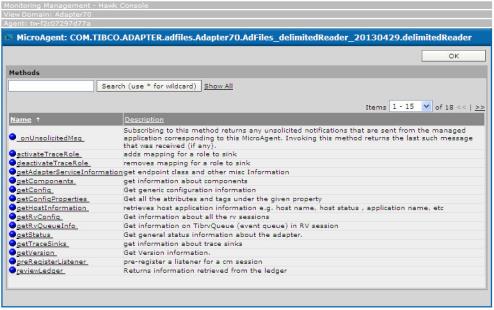
Click the method you want to invoke, the displayed Method dialog shows a Method pane with the detailed definition of the method and a Invocation pane for you to invoke or subscribe to the method.
The following figure shows the Method dialog for the getAdapterServiceInstance method of an adapter microagent:
Figure 128: Hawk Console - Microagent Dialog - Method Dialog
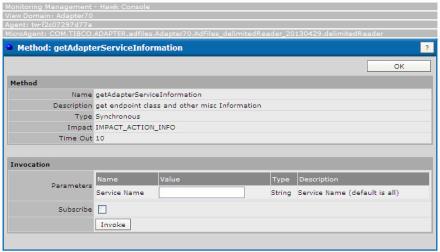
Enter the values in the Parameters fields and click the Invoke button to invoke the method. The method results will be displayed.
You can also subscribe the method by selecting the Subscribe check box.