Managing Schema Files
If you are using a revision control system, you must manually add some configured resources to the revision control system and check in the resources when completing the instance configuration.
When you configure an adapter service, the adapter creates a corresponding set of schema files in the AESchemas folder. For TIBCO ActiveMatrix Adapter for Database, as part of the service configuration, the adapter creates schema files in project_root/AESchemas/ae/ADB. For example, if you configure Publication Service or Subscription Service in an adapter configuration PubAdapter or SubAdapter, the following files are created:
project_root/AESchemas/ae/ADB/PubAdapter.aeschemaproject_root/AESchemas/ae/ADB/SubAdapter.aeschema
If you configure Request-Response Service in an adapter configuration RpcAdapter, the following file is created:
project_root/AESchemas/ae/ADB/RpcAdapter.aeschemaThe ae.aeschema file under project_root/AESchemas/ae.aeschema is modified to update custom scalars if necessary.
When you save the project and specify a revision control system, the adapter displays a warning dialog that additional files were created and you have to add them to the revision control system. This warning is displayed only when the files are created for the first time. The following figure shows the displayed warning dialog:
Figure 50: Add Files to the Revision Control System Warning Dialog
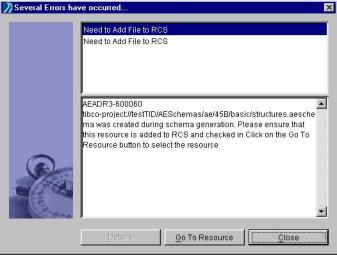
The warning contains a Go To Resource button that helps navigate to the resource. Click Multi-User > Add Resources To RCS from the menu to add these files to the revision control system.
|
Tip |
When working with the
|