Preregistering a Certified Subscriber
You can add one or more certified subscribers, or listeners, for a publisher adapter that sends messages on subjects using the RVCM quality of service. The name of the subscriber is added to the preregistered list of the publisher adapter. The subscriber can be a TIBCO ActiveMatrix Adapter for Database subscriber, or any other TIBCO Rendezvous subscriber.
A subscriber adapter in the preregister list is certified to receive all messages sent on the specified subject using the RVCM quality of service. If a subscriber is not preregistered, it might miss one or more of the initial messages sent by the publisher adapter.
To preregister a certified subscriber in TIBCO Designer, follow these steps:
Procedure
| 1. | In the Project panel, under the publisher adapter, expand Advanced > Sessions > adbadapterInstanceNamervcmRvCmSession endpoint object. |
| 2. | Click the publisher endpoint in the Design panel. The Configuration tab for this endpoint is displayed. |
Figure 147: Publisher Endpoint: Configuration Tab
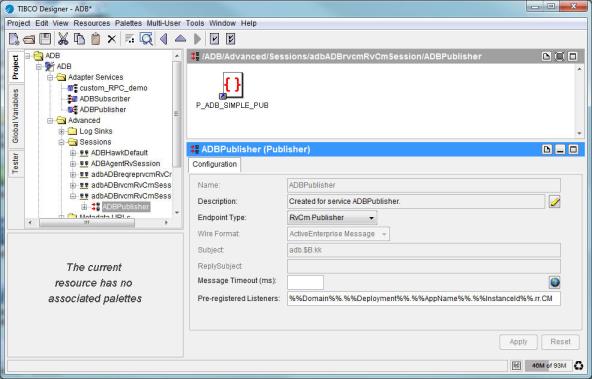
| 3. | Verify the name of the certified subscriber in the Preregistered Listeners field: %%Domain%%.%%Deployment%%.%%AppName%%.%%InstanceId%%.rr.CM. |
|
Note |
|
In this example, the current adapter name is ADB.
| 4. | Click Apply. |
Apart from preregistering a certified subscriber in TIBCO Designer, you can add a subscriber adapter to a preregistered list by setting the preregistered listeners in the adbagent.tra file. The following example shows the configuration:
Procedure
| 1. | Create an instance and add a Publication Service to the instance with Rendezvous Certified enabled. Similarly, create another instance and add a Subscription Service to the instance with Rendezvous Certified enabled. |
| 2. | Set the message subject of the Publication Service to a parameterized subject, for example, adb.$B.kk. Set the message subject of the Subscription Service to a default subject, for example, adb.sub.kk. |
Figure 148: Publication Service: Parameterized Subject
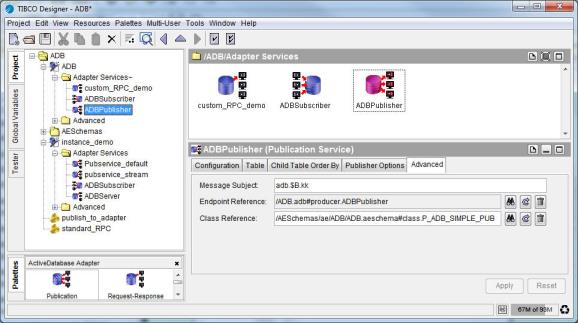
| 3. | Set the CM name in the RVCM session to sub.CM.tra. |
| 4. | Set the adb.pub service name.preRegisteredListeners subjectName1:listenerName1, subjectName2:listenerName2 property to adb.ADBPublisher.preRegisteredListeners adb.sub.kk:sub.CM.tra in the adbagent.tra file. |
|
Note |
The preceding configuration does not take effect, if the database column for creating the parameterized subject contains either of the following characters:
|