Invoke an Adapter Request-Response Server
The Invoke an Adapter Request-Response Server activity is used to communicate with Request-Response Service. This service invokes an operation with input and output of the adapter.
Invoke an Adapter Request-Response Service is configured based on adapter configuration, and the activity uses the information in the adapter configuration to configure this activity.
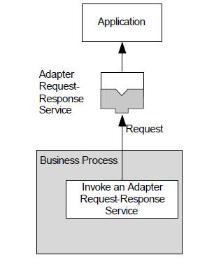
The following figure illustrates an Invoke an Adapter Request-Response Server activity sending a request to Request-Response Service.
General
The General tab has the following fields:
| Field | Module Property? | Description |
|---|---|---|
| Name | No | The name displayed as the label for the activity in the process definition.
The default value is InvokeanAdapterRequest-ResponseServer. |
| Adapter Service | No | The preconfigured Request-Response Service. Specify the adapter service when configuring the adapter.
Click
|
| Operation | No | Operations defined by the schema used in the selected adapter service.
Select the operation that the process definition implements from the list. |
| One Way | No | A read-only field that displays whether the selected operation is one way. |
| Custom Schema | No | Select or clear the checkbox to specify whether you want to supply an output class for this activity.
Note: The feature of Custom Schema in TIBCO ActiveMatrix BusinessWorks 6 is the same as CustomAESchema in TIBCO ActiveMatrix BusinessWorks 5.
|
| Transport Configuration | Click the Transport Configuration link to configure a transport in the Advanced tab. |
 to locate the appropriate service for this activity.
Description
In the Description tab, you can enter a short description for the activity.
Advanced
The Advanced tab contains the Transport Type field. You can select a transport type in the Transport Type list. For more information, see Transport Type.
Input Editor
The Input Editor tab defines the schema used for messages: Map, Stream, or XML Text. Map messages are name or value pairs.
You can use the schema to define the structure of the outgoing request and the incoming reply. The schema defined in the Input Editor tab becomes the body of the message in the Input tab.
Output Editor
The Output Editor tab defines the schema used for messages: Map, Stream, or XML Text. Map messages are name or value pairs.
You can use the schema to define the structure of the outgoing request and the incoming reply. The schema defined in the Output Editor tab becomes the body of the message in the Output tab.
Input
The following table lists the input items for this activity:
| Input Item | Data Type | Description |
|---|---|---|
| subject | String | The subject of the message. |
| requestTimeout | Integer | When publishing in request/reply mode, you can specify the timeout (in milliseconds) to wait for the reply. Note: 1. When requestTimeout is set to -1 and if the RPC server is not responding, then the InvokeanAdapterRequest-ResponseServer activity waits indefinitely.2. When requestTimeout is set to 0 or blank and if RPC server is not responding, then the InvokeanAdapterRequest-ResponseServer activity waits for default timeout duration (10 minutes.)3. When requestTimeout is set to any integer greater than 0 and if RPC server is not responding, then InvokeanAdapterRequest-ResponseServer activity's timeout duration is based on the requestTimeout value. |
| replySubject | String | The reply subject of the message. |
| businessKey | String | This string is appended to the AE tracking specified in the
trackingInfo field.
Note: It is good practice to have all publishers in a process use the same business key. Only the most recent business key of the publisher is used in the tracking info for the message.
|
| OtherProperties | Complex | This element contains the message properties for the message. Only properties applicable to this type of message are displayed.
It is available only when JMS Queue or JMS Topic is the transport and JMS Application Properties in the Transport Type configuration are specified. For more information about message properties, see "JMS Properties" in TIBCO ActiveMatrix BusinessWorks Bindings and Palette Reference. |
Output
The following table lists the output items for this activity:
| Output Item | Data Type | Description |
|---|---|---|
| replyDestination | String | A reply message can have a reply destination, so that the two applications can communicate with incoming messages.
This element contains the reply subject (RV) or destination (JMS) set on the reply message, if one is set. If no reply subject or destination is set on the reply message, this element is not populated. |
| trackingInfo | Complex | The AE tracking information of the sender.
This element is a concatenation of "BW". + Application_Name + Module_Name + Process_Name + Activity_Name + User_Part (Business_Key). |
| JMSHeaders | Complex | This element contains the message header fields for the message. Only properties applicable to this type of message are displayed.
It is available only when JMS Queue or JMS Topic is the transport. For more information about message header fields, see "JMS Properties" in TIBCO ActiveMatrix BusinessWorks Bindings and Palette Reference. |
| OtherProperties | Complex | This element contains the message properties for the message. Only properties applicable to this type of message are displayed.
It is available only when JMS Queue or JMS Topic is the transport and JMS Application Properties in the Transport Type configuration are specified. For more information about message properties, see "JMS Properties" in TIBCO ActiveMatrix BusinessWorks Bindings and Palette Reference. |
| body | Complex | A complex schema type specified for the adapter service or a complex schema type designated by a user. |
Fault
The Fault tab lists the possible exceptions generated by this activity.
| Fault | Generated When... |
|---|---|
| TransportException | The transport cannot be created. |
| SerializationException | The outgoing message cannot be serialized. |
| DeserializationException | The incoming response message cannot be serialized. |
| ConfirmationException | The message cannot be confirmed. |
| TimeoutException | A timeout error occurs. |
| OperationException | The adapter service returns an exception encountered while performing the operation. Any exception class defined on the schema can be returned.
The potential exceptions are displayed as a choice element for activities after an error transition. |