Copyright © TIBCO Software Inc. All Rights Reserved


Chapter 1 Introduction of Examples : Converting DAT Files to Project Files

Converting DAT Files to Project Files
For a DAT file, you cannot open it in TIBCO Designer directly and make modifications to the configurations. To do this, perform the following steps:
1.
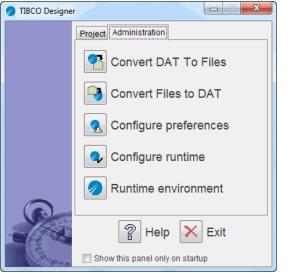
Open TIBCO Designer, the TIBCO Designer window opens. Click the Administration tab.
 
2.
Click Convert Dat To Files. The Convert Dat To File-Based Project windows opens.
3.
Click Browse to select the DAT file to be converted to a multi-file project. Click Browse to specify the project directory to which it should be saved.
4.
5.

Copyright © TIBCO Software Inc. All Rights Reserved