Specifying a Custom Alert
In addition to tracing, using TIBCO Administrator you can specify that you wish to be alerted if certain conditions are met. This section gives one example. A detailed discussion of tracing is included in Adding a Custom Rulebase to a Process or Service.
To specify a custom alert, follow these steps:
- Procedure
-
Choose Application Management > Timer Application > bwtutorial > Configuration.
-
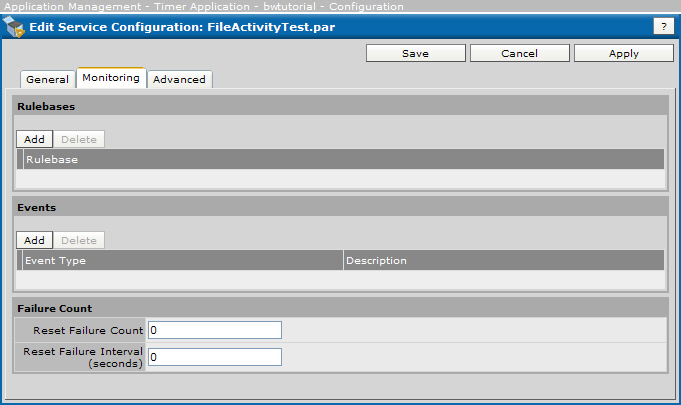
In the Configuration Builder panel, expand the bwtutorial application and click FileActivityTest.par, and then click the Monitoring tab.
Figure 114: Specifying a Custom Alert
-
In the Events pane, click Add.
-
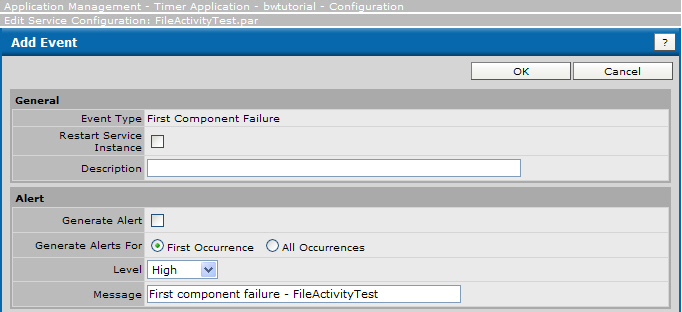
In the dialog that appears, make the following changes (shown in the next figure).
-
In the General pane, select First Component Failure in the Event Type dropdown list.
-
In the Alert pane, select the Generate Alert checkbox.
-
Select the All Occurrences radio button and select High in the Level dropdown list.
-
In the Message field, type
First component failure - FileActivityTest. -
Click OK, and then click Save.
TIBCO Administrator will now display a high-level alert with the message upon first failure of this process. If you wanted, you could also have an email sent in the event of component failure.
Figure 115: Add Event
-
-
When you are returned to the Configuration Builder notice that it indicates that services require deployment. Click Deploy and the changes will take effect.