TIBCO Enterprise Message Service Plug-in
The TIBCO Enterprise Message Service plug-in (EMS plug-in) allows you to use the TIBCO Administrator to configure a TIBCO Enterprise Message Service server. The EMS plug-in is included in your TIBCO Administrator installation.
The EMS plug-in includes online help files that describe each parameter that can be set from within the TIBCO Administrator GUI. You should be familiar with the TIBCO Enterprise Message Service documentation, which explains the full use of the server.
You must first install the TIBCO Enterprise Message Service server, and then run TIBCO Domain Utility to add the EMS plug-in to your administration domain. After the EMS plug-in is installed, you can access it from the TIBCO Administrator GUI by clicking Application Management > All Services Instances > machine-name - EMS port.
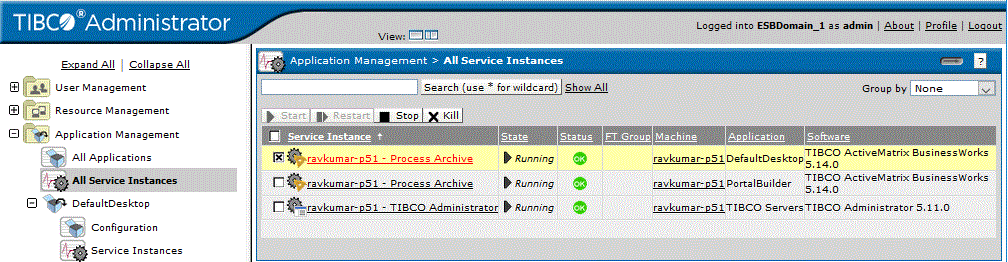
tibemsd.exe) is running before you start the EMS plug-in from the TIBCO Administrator GUI.The next diagram shows the All Service Instances panel with the EMS server status listed.
Figure 6: Service Instances
The users and roles defined in your domain can be synchronized with the users and groups defined for the TIBCO Enterprise Message Service server. Both users and their passwords become known to the server after synchronization.
If your domain is integrated with an LDAP directory server, synchronization with the users and groups defined for the TIBCO Enterprise Message Service server is not supported. An LDAP directory server does not allow passwords to be exported, and as a result passwords would not be exported on synchronization.
To Set Parameters Using the EMS Plug-in
- Procedure
-
Click Application Management > All Service Instances.
-
Expand the TIBCO Enterprise Message Service.
-
Click the server instance name.
You can set options for the following:
-
Server Parameters
-
Queues Parameters
-
Topics Parameters
-
Durables Parameters
-
Connection Factories Parameters
-
Connections Parameters
-
Producers and Consumers Parameters
-
Routes Parameters
-
Bridges Parameters
-
Transports Parameters
-
Transactions Parameters
-
Users and Groups Parameters
-
JNDI Bindings Parameters
-