Working With Application Domains
An application domain stores application data in a repository that is separate from the administration domain repository. This allows you to store configuration information required by the application in a repository that is independent of the administration domain repository.
An application domain is configured under an administration domain and uses the storage type defined for the administration domain. If an administration domain uses a file-based repository, each application domain also uses a file-based repository. If an administration domain uses a database repository, each application domain also uses a database repository. Multiple application domains can be configured under the same administration domain.
The domain administrator for the administration domain is also the domain administrator for each application domain created inside the administration domain.
By defining an application domain, you can specify that one or more applications use a different repository to store application generated data.
For example:
-
Applications can use local databases for repositories instead of storing application data in the database used by the administration domain.
-
If you are deploying multiple applications that are based on different versions and there is a model change between these versions, you can select a separate application domain for each version.
-
If you are using a file-based repository for an administration domain and the repository is large in size, you can separate application data into smaller repositories.
You must first create an application domain and then assign your applications to the domain. See your TIBCO product’s documentation set for more information.
Permissions
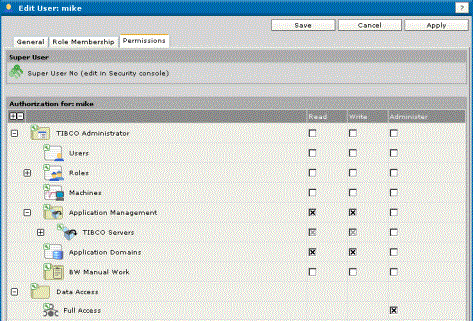
A user must have Write permission set for the Application Domains console. If the administration domain uses a file-based repository, the user must also have Data Access permission set as shown in the next diagram.
To Create an Application Domain
- Procedure
-
Click Resource Management > Application Domains.
-
Click New.
-
Provide values in each field. See New Application Domain Panel for field descriptions.
-
Click Save.
To Assign an Application to an Application Domain
This example uses an application that is part TIBCO PortalBuilder.
- Procedure
-
Expand Application Management and expand the application.
-
Click Configuration.
-
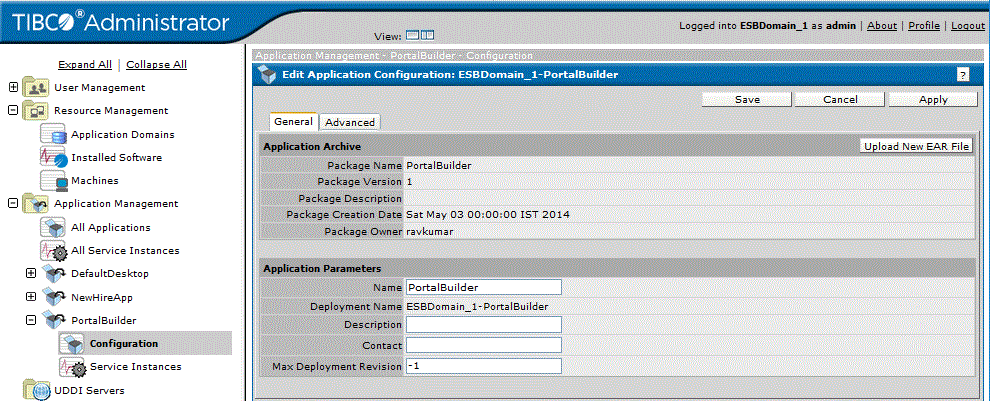
In the Configuration Builder panel, click the application name.
-
In the Edit Application Configuration panel, click the Advanced tab.
-
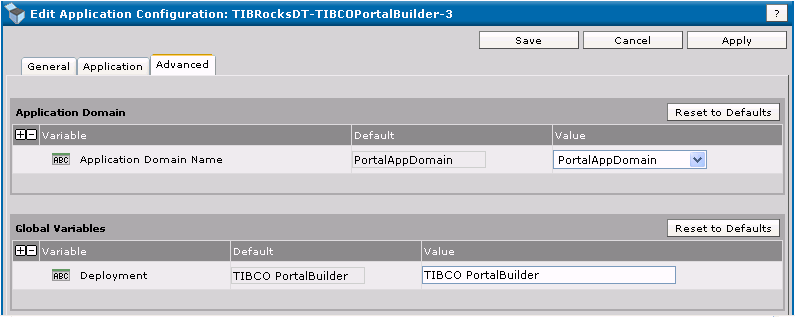
Under Application Domain, click the Value field arrow and select the application domain to associate with the application.
-
Click Save.