Configuration Tab
The following figure shows the Configuration tab.
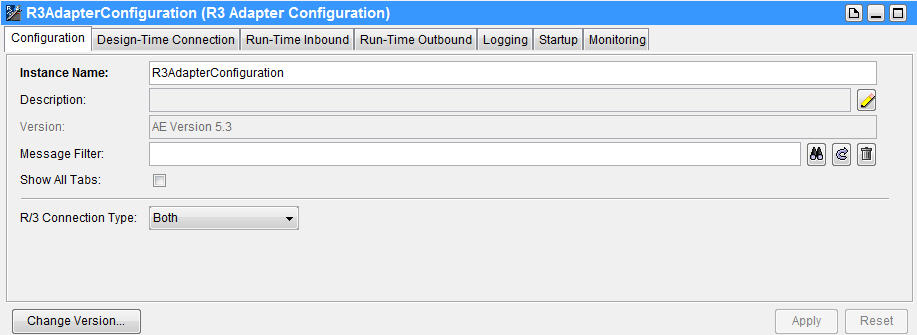
The following table lists the fields in the Configuration tab.
|
Name |
Description |
|||||||||
|
Instance Name |
Name of the adapter instance. This name corresponds to the adapter instance configuration object stored in the Use the default name or replace it with a name of your choice. See Guidelines for Choosing an Instance Name for more information. |
|||||||||
|
Description |
(Optional) Description of the adapter instance. |
|||||||||
|
Version |
Version of the adapter repository. When a new adapter instance is created in TIBCO Designer 5.7 or above, the version is set to |
|||||||||
|
Message Filter |
(Optional) Filter that performs manipulations on incoming and outgoing data before sending it on the network or handing it to the target application. You can write filters by using TIBCO Adapter SDK. See TIBCO Adapter SDK Programmer’s Guide for information about writing a message filter. |
|||||||||
|
Show All Tabs |
(Optional) Select this checkbox to display additional tabs for configuring advanced options. This checkbox is clear by default. See Guidelines for Showing All Tabs for when you need to show all the configuration tabs. |
|||||||||
|
R/3 Connection Type |
The type of instance. Client and server connection references are created in the Adapter_NameActiveConnections folder by default. See Guidelines for Choosing R/3 Connection Type . Available options are:
|
|||||||||
|
Change Version |
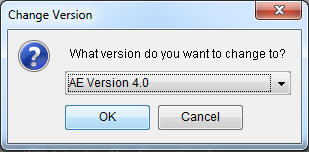
Click this button to change the version of the adapter repository. See the following figure and table for more detailed information. |
|
Name |
Description |
|||||||||||||||
|
What version do you want to change to |
From the What version do you want to change to list, select the adapter environment version of your preference. Available options are:
Note: The current version of the adapter repository is not shown in the drop-down list. |
Guidelines for Choosing an Instance Name
| • | An instance name must use alphanumeric characters. You can use underscore (_) characters, but you cannot use the space character. The entire instance name must be less than 80 characters. |
| • | An instance name cannot use global variables. |
| • | An instance name must be unique with respect to other adapter instances for the same adapter in the project. You can use the same instance name to name an adapter instance for a different adapter in the same project. For example, a TIBCO ActiveMatrix Adapter for SAP instance named TEST and a TIBCO ActiveMatrix Adapter for Siebel instance named TEST can coexist in the same project. |
| • | Each instance name must be unique per adapter within a project even if each instance is defined in a different folder. That is, configuring same-named adapter instances in different folders will not make their names unique. |
When you create an adapter instance, the palette automatically creates several resources for it. The names of these resources are derived from the name of the instance they belong to. The change of the name of the adapter instance results in an automatic change of the resources names. If you manually modify any resource name, this resource name is not automatically changed next time you rename the adapter instance.
When you name the adapter instance, the following resources are named automatically:
| • | Subject name |
| • | CM name |
| • | CMQ name |
| • | Ledger file |
| • | Default client connection |
| • | Default server connection |
| • | Active connection |
Guidelines for Showing All Tabs
You must select the Show All Tabs checkbox, if any of the following configurations are required:
| • | Configuring Outbound TID management to Remote |
| • | Configuring Inbound TID management to Local or Remote |
| • | Configuring Termination Subject or Topic |
| • | Configuring an adapter instance to a specific ActiveConnection Reference |
| • | Configuring Discovery Agent Plugin |
For instructions on setting advanced configuration parameters, see Advanced Topics.
Guidelines for Choosing R/3 Connection Type
Select the type of instance:
| • | Inbound |
If you select Inbound from the R/3 Connection Type list, proceed to enter the Inbound configuration parameters in the Run-Time Inbound tab.
| • | Outbound |
If you select Outbound from the R/3 Connection Type list, enter the Outbound configuration parameters in the Run-Time Outbound tab.
| • | Both |
Default setting. If you select Both from the R/3 Connection Type list, enter configuration details in both the Run-Time Inbound and Run-Time Outbound tabs.
The Both adapter instance is a test adapter instance. It is not recommended to switch from Both to Inbound or from Both to Outbound. There is no automatic mechanism to change the adapter services to reflect any change. You need to manually delete the Publication Service service if a change was made from Both to Inbound or vice versa.
An Inbound or an Outbound instance can be changed to a Both instance. It is recommended that no services be configured before you change the instance type from Both to either Inbound or Outbound.
Regardless of the value of type you select from the R/3 Connection Type list in the Configuration tab, a client connection and a server connection references are created by default when you create an adapter instance.