Configuration Tab
This is the standard configuration. You can specify Publication Service configuration options by using the Configuration tab.
Communication with the SAP system requires the existence of “logical systems,” the identification of IDoc “message types,” and other custom modifications using the SAP GUI. While these are not adapter configuration issues, they must be complete before IDocs can be transmitted.
Depending on which transport type you choose, you can choose one of the following sets of configuration:
| • | Transport Type: JMS |
| • | Transport Type: Rendezvous |
Transport Type: JMS
The following figure shows the Configuration tab for JMS transport.
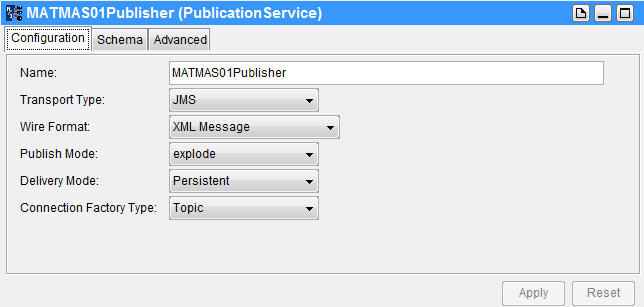
The following table lists the fields in the Configuration tab for JMS transport.
|
Field |
Description |
||||||||||||
|
Name |
The name of the Publication Service service. The default name is |
||||||||||||
|
Transport Type |
The type of the message transport used by the service. See JMS for details. |
||||||||||||
|
Wire Format |
The format in which messages are sent. Available option is:
For integrating two SAP systems, the wire format and transport type for both the publisher and subscriber must be the same, otherwise an error occurs. See Wire Format for details. |
||||||||||||
|
Publish Mode |
The publication mode. Available options are:
See Identifying Publication Mode for details. |
||||||||||||
|
Delivery Mode |
The delivery mode of the message. Available options are:
See Delivery Mode (JMS Only) for details. |
||||||||||||
|
Connection Factory Type |
The type of client connection to the TIBCO Enterprise Message Service server. Available options are:
See Connection Factory Type (JMS Only) for details. |
Transport Type: Rendezvous
The following figure shows the Configuration tab for Rendezvous transport.
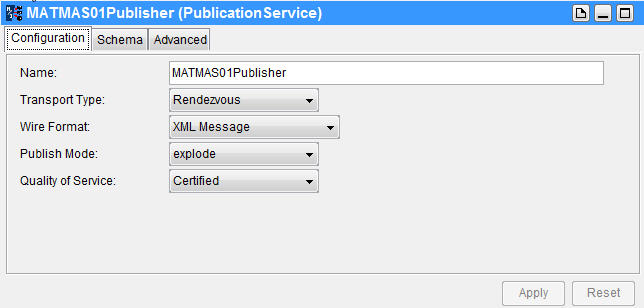
The following table lists the fields in the Configuration tab for Rendezvous transport.
|
Field |
Description |
||||||||||||
|
Name |
The name of the Publication Service service. The default value is |
||||||||||||
|
Transport Type |
The type of the message transport used by the service. See Rendezvous for details. |
||||||||||||
|
Wire Format |
The format in which messages are sent. Available options are:
For integrating two SAP systems, the wire format and transport type for both the publisher and subscriber must be the same, otherwise an error occurs See Wire Format for details. |
||||||||||||
|
Publish Mode |
The appropriate publication mode. Available options are:
See Identifying Publication Mode for details. |
||||||||||||
|
Quality of Service |
The type of Quality of Service for publishing messages. Available options are:
See Quality of Service (Rendezvous Only) for details. |
Identifying Publication Mode
You can configure the publish mode by selecting one option from the Publish Mode list. The following section describes each available mode in detail:
| • | None Mode |
| • | Explode Mode (Default) |
| • | Exploded Batch Mode |
| • | IDocFormat Mode |
None Mode
In the default interface mode, the IDoc output from an SAP system is processed in the native RFC table format. This compressed form uses metadata to describe an IDoc. The IDoc data is most efficiently transmitted in this format, because no additional processing is required to expand the IDoc segments and fields. For best performance the decompression step is left for the stage when the data is actually consumed.
IDocs of SAP System Releases 3.x and 4.x, which are port types 3 and 4, are supported. SAP 4.x releases are also capable of sending IDocs in a format understandable by older releases, including 3.x.
For SAP releases 4.x, an IDoc contains the following attributes:
| • | EDI_DC40 (one control record) |
| • | EDI_DD40 (multiple data records) |
For SAP releases 3.x, an IDoc contains the following attributes:
| • | EDI_DC (one control record) |
| • | EDI_DD (multiple data records) |
The following figure shows a truncated example of the 4.x IDoc data transmitted in the default “unexploded” mode. In this example the control record follows the data records. Note that for transmission purposes, the order is not significant to the adapter.
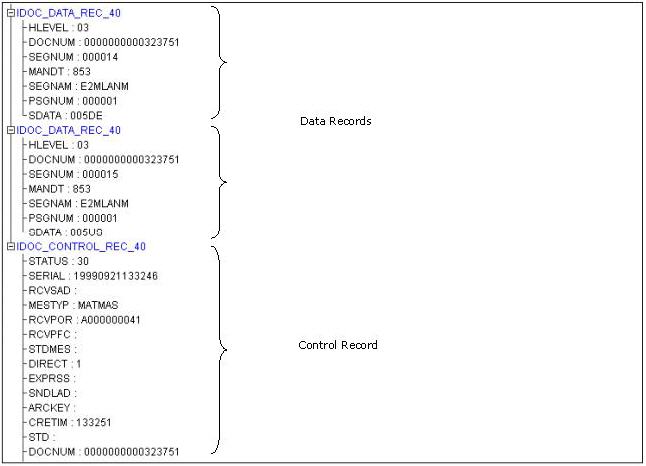
Examples of XML schema:
| • | For an IDoc in 3.x mode |
<class name="Inbound_IDoc_PROCESS">
<attribute class="sequence[EDI_DC]" name="IDoc_CONTROL"/>
<attribute class="sequence[EDI_DD]" name="IDoc_DATA"/>
</class>
| • | For an IDoc in 4.x mode |
<class name="IDoc_Inbound_ASYNCHRONOUS">
<attribute class="sequence[EDI_DC40]" name="IDoc_CONTROL_REC_40"/>
<attribute class="sequence[EDI_DD40]" name="IDoc_DATA_REC_40"/>
</class>
Explode Mode (Default)
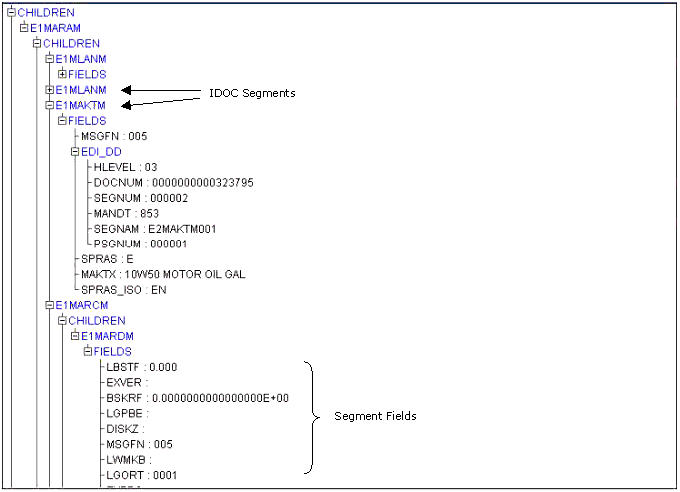
IDocs are initially received in compressed form as RFC tables. The received IDoc is expanded and serialized into a hierarchical ActiveEnterprise message structure, namely the ActiveEnterprise Message format, using IDoc metadata. The following figure shows an IDoc in expanded format. Metadata specifies the hierarchical structure, including contained records and fields, associations between different segments, and repetition information. The ActiveEnterprise Message format is described in TIBCO Adapter SDK Concepts.
If multiple SAP JCos are received in a batch, then each IDoc in the batch is split from the other IDocs and sent individually.
The SAP system sends out data to the adapter with padded blanks wherever a field in the IDoc segment does not occupy the complete field length or a field is not populated at all.
By default, the adapter trims off the trailing spaces from blank padded fields, and cuts out blanks-only fields.
The data published for a particular IDoc segment field is based on the actual data sent by the SAP system. The adapter does not pad the value provided by the SAP system with trailing whitespace.
Exploded Batch Mode
Using Exploded Batch mode, the adapter sends a batch of IDocs in Explode mode. Similarly on the subscriber side, the adapter receives the IDocs in a batch and processes them in SAP.
If the ALE Outbound profile for an IDoc type is set up to Collect IDocs, IDocs are collected within the SAP system till the packet size value is reached, and then sent to the adapter in one time.
Exploded Batch mode ensures that individual IDocs are “exploded” to a self-describing format and also maintained as a batch. The batch of exploded IDocs is then published as one single message by the adapter.
The data published for a particular IDoc segment field is based on the actual data sent by the SAP system. The adapter does not pad the value provided by the SAP system with trailing whitespace.
IDocFormat Mode
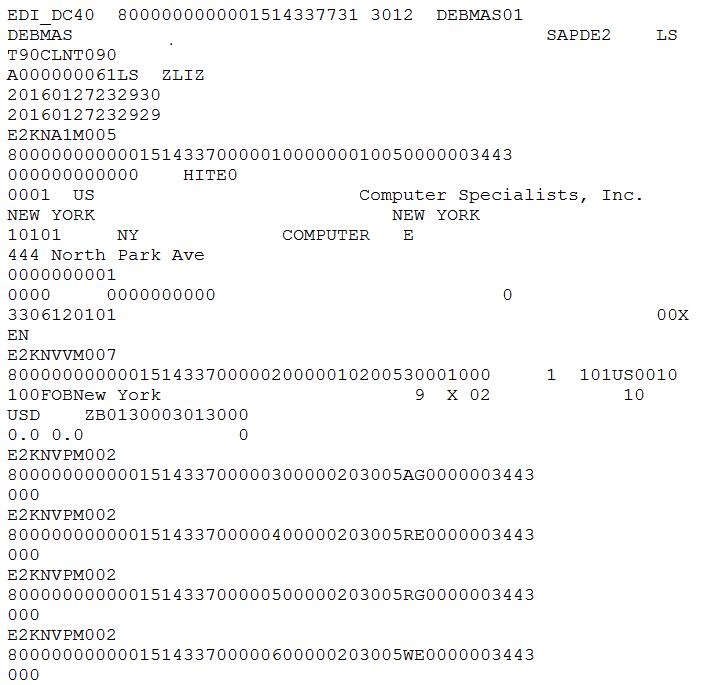
In IDocFormat mode, no transformation is performed in the IDoc content. The IDoc is presented in an original string format. See the following figure.
This format is useful in cases where systems and applications understand the SAP IDoc format.
For details about the usage of the IDocFormat publish mode, see “IDoc Format Publishing Mode” in TIBCO ActiveMatrix Adapter for SAP Examples.
Only IDocs of SAP System Release 4.x is supported. The IDoc contains the following attributes:
| • | EDI_DC (one control record) |
This attribute is populated using the IDoc control record fields for the Outbound IDoc but it is not required to be mapped for the Inbound IDoc.
| • | IDocMsg (multiple data records) |
Similar to Explode mode, only one IDoc is exchanged per message. When you send multiple IDocs from SAP system or TIBCO environment in one call, each IDoc is sent individually.
If the transport type is JMS, the control fields are also passed as JMS properties. The property name consists of the prefix, SAPIDOC_ and the IDoc control record field. For example, if the field is DOCNUM, the corresponding JMS property is SAPIDOC_DOCNUM.
For Publication Service, except the above JMS properties, you can also use the SAPJCO_ JMS properties to route IDoc messages to a specific receiver. See “IDoc Format Publishing Mode” in TIBCO ActiveMatrix Adapter for SAP Examples for details about the usage of the JMS properties.