Responding to Dynamic Changes in the Application Server Environment
Load-balancing Outbound messaging on the SAP system is achieved by clustering multiple application servers under a central SAP instance.
The Outbound adapter can respond to dynamic changes to such clustered environments in terms of detecting addition or removal of application servers to or from the cluster. The Outbound adapter automatically registers itself with all active application servers in a cluster and receives and processes messages from the servers.
To achieve this, the Outbound adapter is to be run in conjunction with a discovery agent that is supplied with the adapter Runtime environment installation. The following figure explains the steps involved in this dynamic discovery scenario, where gw1 and gw2 are the gateway hosts through which the SAP application servers communicate to the Outbound adapter.
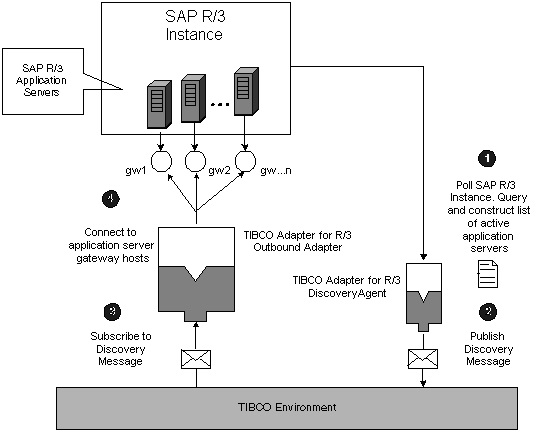
The Discovery Process
The Discovery Agent is a special pre-configured Inbound adapter. The discovery process involves the following steps, also schematically presented in Posting BAPIs/RFCs/IDocs from Multiple Gateways in the Outbound Adapter, Posting BAPIs/RFCs/IDocs from Multiple RFC Destinations in the Outbound Adapter
- Procedure
-
Discovery agent polls the central SAP instance, retrieves the list of application servers connected to the central Instance.
The Outbound adapter configurations register on the gateway hosts of discovered application servers.
-
The discovery agent publishes the list as a message to the TIBCO environment. The Outbound adapter configurations pick up the discovery message.
Note:If the adapter and the discovery agent span different network subnets, use of Rendezvous Enterprise Daemon is required. You must obtain a separate license for the Rendezvous Enterprise Daemon that is appropriate for your usage.
The Outbound adapter automatically disconnects from application servers that have gone down and cleans up connections after all attempts to retry connecting to the application server are exhausted. The Outbound adapter does not create a new connection to a gateway host, if a connection is already connected to a gateway host.
Configuration of Discovery Agent
The discovery agent is a configured Inbound adapter instance. This section contains information on the steps needed in order to configure the actual discovery agent using TIBCO Designer. You can deploy the project once you have followed these steps.
When you specify a list of program IDs using the TRA property in the adr3.discovery.pid, if the list of program IDs is not comma-delimited then only the first program ID is taken into effect.
-
Create a project and add an R3 Adapter Configuration resource.
-
Change the R/3 Connection type to
Inbound. -
Configure the necessary connection information for a client connection.
-
Create a Request-Response service using the function module
RFC_GET_LOCAL_SERVERS. Once the module is downloaded, configure the necessary transport protocol and destination. -
Create a new session using the necessary transport protocol.
Using the new session , create a publisher endpoint and assign the required destination to it.
The destination entered must match the destination maintained in the TRA property adr3.discovery.listenerSubject in the Outbound adapter instance.
Using the new session, create a client and assign the same destination entered as a Request-Response service for function module RFC_GET_LOCAL_SERVERS.
Maintain the Discovery Agent plugin properties in the General tab of the adapter instance in the TIBCO designer project.
In the General tab, select the Enabled checkbox.
In the Polling Client Reference field, enter the client that is created for the session.
Specify the Polling Interval field accordingly. The default value is 60000 and it is maintained in milliseconds. This value is used by the discovery agent as the interval for polling the available list of SAP application servers. If the value is 6000 then the discovery agent refreshes the list of SAP application servers every 60000 milliseconds or 60 seconds. You can use global variable to configure this field.
Specify the Polling Publisher Reference field with the publisher that is created for the session.
Specify the Application Server Domain Name field accordingly. We recommend maintaining this field so that Domain Name Services (DNS) is used for host name resolution. You can use global variable to configure this field.
For information on the General tab, see General Tab.
The Discovery Agent is configurable in TIBCO Designer by creating a project. When the project is created, you cannot add another adapter service or remote TIDManager adapter service.
Running the Discovery Agent
You can start the discovery agent with the following command on the command line.
adr3Discoverer --propFile adr3Discoverer.tra
Then specify the following values:
| — | tibco.repour <repourl>
|
| — | tibco.configurl <configurl>
|
You also can deploy the Discovery Agent by using TIBCO Administrator as any ordinary adapter.
Configuring the Outbound Adapter
The Outbound adapter does not need any additional configuration in TIBCO Designer to be able to respond to dynamic changes to the application server environment.
The following properties need to be set in the adapter launcher file to enable this feature for an Outbound adapter instance.
adr3.discovery — Specify whether to enable the dynamic discovery feature.
The feature is commented by default. To enable the dynamic discovery feature, uncomment the property.
adr3.discovery.pid — Specify program IDs on which to register the gateway of the discovered application server.
If the dynamic discovery feature is enabled, this is a mandatory property. An error occurs and then the adapter stops if this property is not specified.
Discovery Agent: The Outbound adapter log does not give any error when it establishes a connection to a Program ID sent by the discovery message, and this Program ID does not exist in the SAP System.
You can specify multiple program IDs as comma-separated values.
For example:
adr3.discovery.pid=tibcotest
adr3.discovery.pid=tibcotest,IDoctest
adr3.discovery.listenerSubject — Specify the subject to be listened on to subscribe to the discovery message published by the discovery agent. The discovery message contains the list of active application servers. Ensure that the adr3.discovery.listenerSubject matches the publishing subject on the discovery agent side.
For example:
adr3.discovery.listenerSubject=APPSERVER.DISCOVERY.DYNAMIC
If not specified, this property defaults to R3.APPSERVERS.ACTIVE.
adr3.discovery.listenerSession — Specify the TIBCO Rendezvous or JMS session to use for the discovery listener.
A valid session by this name is available in the project.
For example:
adr3.discovery.listenerSession=MyDiscoverySession
If not specified, this property defaults to R3RVSession.
adr3.discovery.maxconnections — Specify the maximum number of connections that can be established to the gateway of each discovered application server.
If not specified, it defaults to 1.
adr3.discovery.maxretryinterval — Specify the maximum number for the retry interval. This property defines the behavior of the Outbound adapter in the event of connection to the SAP gateway server. Connection loss can result from network glitches or a planned shutdown. Because the adapter cannot distinguish between the two causes, it behaves in exactly the same way in both situations.
If an SAP Gateway server has been brought down because of a planned shutdown, it still continues to establish a valid connection until the maximum retry interval is reached.
For example:
adr3.discovery.maxretryinterval=120
Note that the maximum retry interval must be specified in seconds.
If not specified, maxretryinterval defaults to 60 seconds. If the value supplied is less than 1 second then maxretryinterval defaults to 1 second.
adr3.discovery.appserver.suffix — This property is appended with the server names returned back by the discovery agent.
For example, if the server name returned by the discovery agent is tibdemo and the value specified is na.tibco.com, then the server connection uses server name tibdemo.na.tibco.com.
It is recommended to use this property when DNS services are required for connectivity.