Terminology
This section lists terms used in SmartMapper Business UI.
By default, SmartMapper Business UI randomly selects a participant from a relationship and sets it as anchor participant to represent this relationship. There is a one-to-one correlation between anchor participant instances and relationship instances.
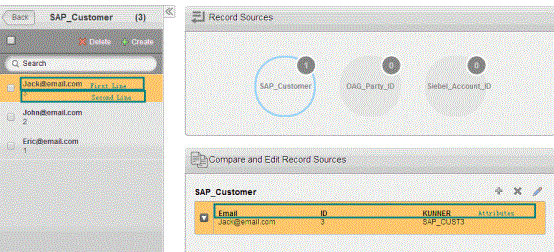
An entity is configured with one or more key attributes and non-key attributes. When the SmartMapper Business UI server is started, the system randomly sets a predefined attribute as display field. The value of the display field is bolded and displayed in the first line to represent an entity instance; values of defined key attributes are displayed in the second line.
Take the SAP_Customer entity as an example, which is defined with three attributes, ID, KUNNER, and Email. ID is the key field. It is added to the Map_Acct_Party_Cust identity relationship, which assembles customer information across SAP, OAG, and Siebel systems.
Log in to SmartMapper Business UI and select the Map_Acct_Party_Cust identity relationship. As shown, the attribute Email is set as the displayed field.