Generating an IBAN
After configuring the process, you can run it to generate an IBAN:
- Procedure
-
In the Design panel, click the Create transition icon
 on the TIBCO Designer toolbar to create transitions between the Generate SWIFT BICPlusIBAN activity and other activities.
 -
In the Tester panel, click the Start testing viewed process icon
 .
.In the Select Processes to Load window, the process checkbox is selected by default.
-
Click Load Selected to run the process.
When the process is running, the black transition arrows pointing to each activity turn green.
During the IBAN generation process, the following operations are performed at the background:
-
Validating the BBAN
-
Generating the check digit
A bank or its customer uses the check digit to perform a sanity check of the routing destination, and an account number from a single string of data at the time of data entry. It is guaranteed to detect any instances where a single character has been omitted, duplicated, mistyped, or where two characters have been transposed. Thus, routing and account number errors are virtually eliminated.
-
-
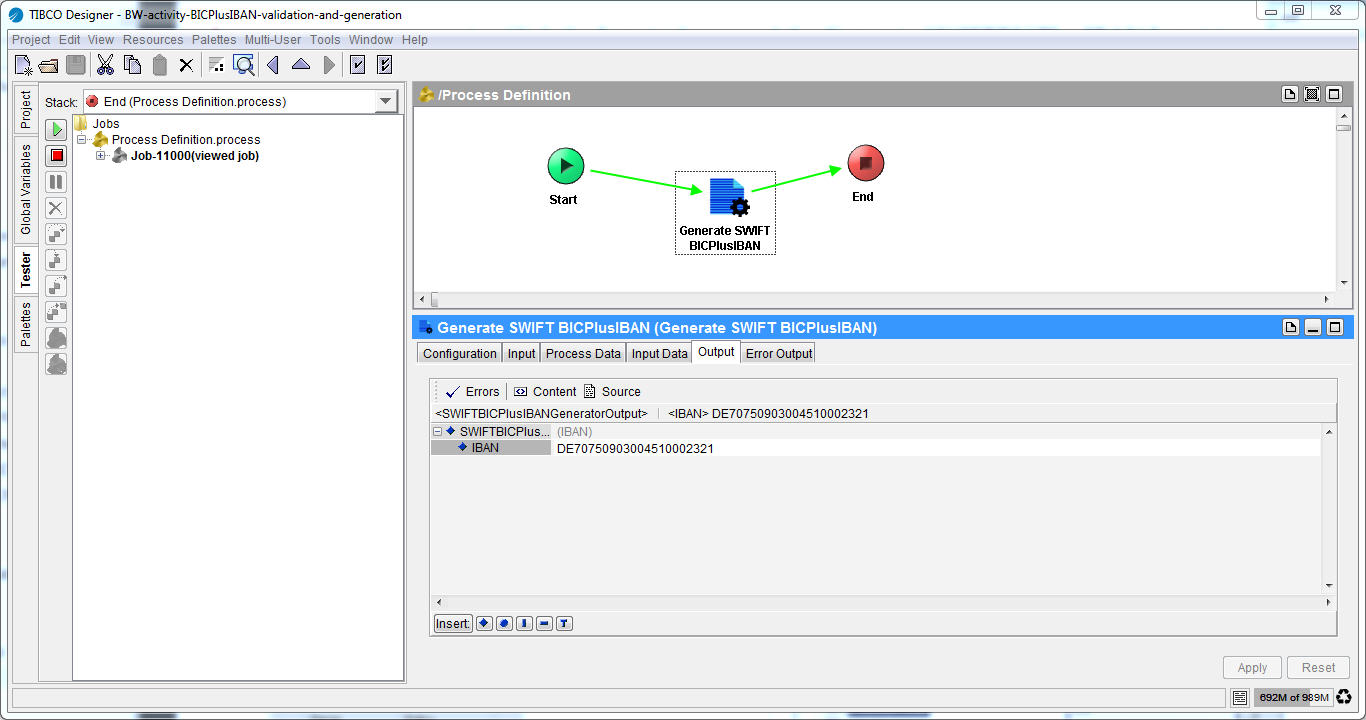
Click the GenerateSWIFT BICPlusIBAN activity, and then click the Output tab to see the output.
The generated IBAN is displayed in the IBAN field. See Output of the Generate SWIFT BICPlusIBAN Activity.
Figure 10: Output of the Generate SWIFT BICPlusIBAN Activity
-
Click the Stop testing icon
 to stop testing and return to Design mode.